
Jun 8, 2017 6:55 AM UTC
Current Functionality

Creo Elements/Direct Modeling - Switch to turn off auto rotate while drawing on a WP

Related products:Creo Elements/Direct

Hello Community,


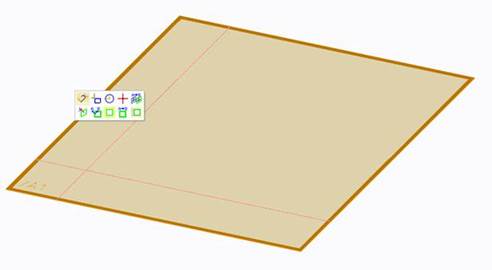
Would it not be great to have a switch to turn off the auto-rotated of a preselected WP (like the screenshot) and then start the 2D command from the mini tool bar?


Whats your optinion?


Thank's Thomas

9 replies

Jun 30, 2017 5:22 AM UTC

I´m not sure if I understand correct:
Try   File / Settings / 2D Copilot / Misc / Automatic Zoom off


Best regards
WoHo

Dec 4, 2017 2:32 PM UTC

Nice Try WoHo,


But try only to have a turned WP like the picture above and then start to scetch a line or a rectangle e.g., then the WP is turning to be planar with the VP. What you mentioned affects only the creation of a WP on an existing 3D geometry or implicit WP creation while directly scteching on an a 3D face.


Please let me knwo if it now clear.


Regards Thomas

Dec 4, 2017 3:03 PM UTC

No - with Automatic Zoom off
If you select a workplane you get the mini toolbar. You can select any function from the mini toolbar and the wirkplane will not rotate.

Regards

WoHo

Dec 4, 2017 3:08 PM UTC

Great! I just tested and it works!


THX WoHo

Dec 4, 2017 3:16 PM UTC

Hi Thomas,

I thought you tested it "before" writing an answer.
Nice to help the specialist.  😉

Regards
WoHo

Dec 4, 2017 3:20 PM UTC

Hi WoHo,


I thought I tested it alreday before you suggested it. But anyway, errors happen every where. Smiley Wink

Thank's for your help!


Regrads


Thomas

May 6, 2022 1:38 PM UTC
Status changed to: Current Functionality

🙂

May 9, 2022 5:27 AM UTC

To mneumueller  

This is it what I have written 5 years ago   😉


May 9, 2022 7:45 AM UTC

to @whofer, yes I saw that -  As part of a clean-up of ideas in wrong/outdated buckets/labels, I also updated some status of older ones, therefore adding the comment.