To the right of "Font" you have "Size" and the option to chose a size from 1 to 7 (default is 3).
That way you can change the size of a highlighted portion of the text you had already written or for the text to come.
Sometimes instead of "Size" the menu reads "2" or whatever the size at the cursor actually is. Not sure why sometime we see "size" and sometimes the size number. Guess its a bug.
In my opinion the line space between the lines is too large!
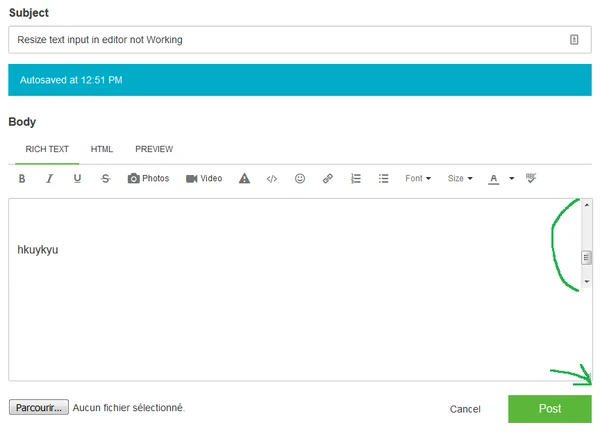
No i talk about the resize feature in text input box, seems to be broken ( I have edited my original port with better screenshot )
Ah, I see. Its not working for me either.
Stop! It works, but not as it should.
Write a longer multinline text until the scrollbar appears at the right side.
Now again try to resize the window. The window does not change, but the area with the text and scrollbar can be made smaller. Sure a bug.
Normally I would have attached a screenshot but not being able to copy it directly from the clipboard via Ctrl-C is not as convenient it should be and as we were used to.
Windchill Satisfaction Survey
Help shape the future of Windchill. Take our 5-minute survey and share your feedback.