
Jun 29, 2016 7:23 PM UTC
Solved

Style Tool for 3-Sided Boundaries


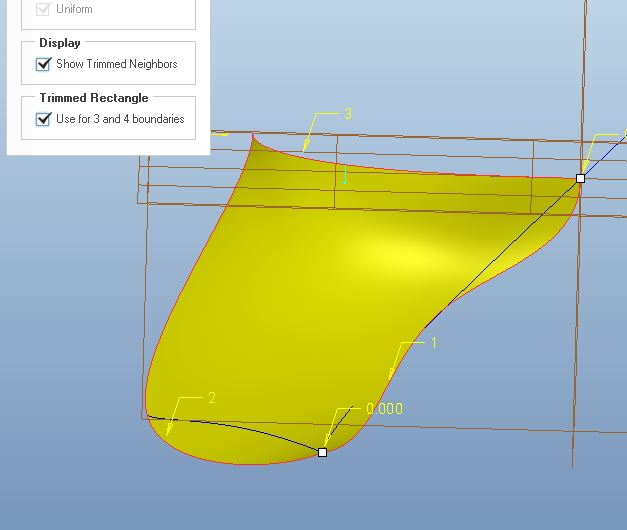
When using the Style tool, there is an option for trimmed rectangles to 3 and 4 boundaries.  Chain 2 is on the working plane (Top Plane), and is there a way to control the surface to make it normal as is approaches the Top Plane?  This is desired, because if the surfaced is mirrored about the Top Plane, the mating surfaces are not tangent to each other.
    Jul 1, 2016 6:58 AM UTC

    Nope, you wont see them since (somehow) creo doesn't see the curves as normal to the plane you are referring too. I haven't looked into how the curves are positioned at the plane (if they are normal, or can be seen as normal) BUT... i made new curves that i defined as normal, then you get the option to set the surf to be normal even when using the "trimmed rectangle option":

    (so i would say that the problem is the curves, not the surf or the special option)

    normal.JPG

    //Tobias

    2 replies

    Jun 30, 2016 12:57 PM UTC

    If curve 1 & 3 are normal to datum plane TOP (SIDE in my image), then when you create the surface, it will have a normal constraint available to you.

    3sided.PNG

    Jul 1, 2016 6:58 AM UTC

    Nope, you wont see them since (somehow) creo doesn't see the curves as normal to the plane you are referring too. I haven't looked into how the curves are positioned at the plane (if they are normal, or can be seen as normal) BUT... i made new curves that i defined as normal, then you get the option to set the surf to be normal even when using the "trimmed rectangle option":

    (so i would say that the problem is the curves, not the surf or the special option)

    normal.JPG

    //Tobias