
Apr 29, 2015 12:22 PM UTC
Question

Re: Results coordinate system, is there a default off?

Erik,

You're talking about turning off the Coordinate Systems in the Visibilities window permanently with a config option (shown below). I don't know if any way to do this, as I have searched for it myself. I can call tech support, and if there isn't a way to do it, then a Product Idea needs to be submitted.
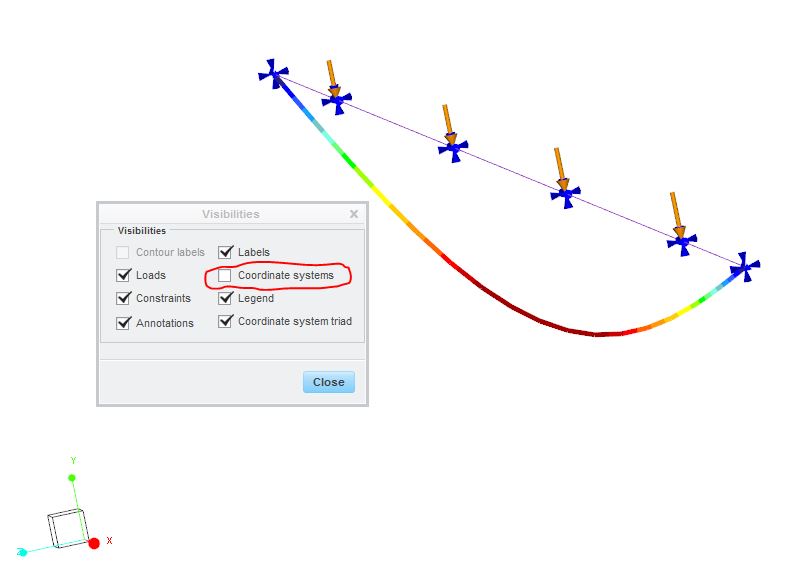
visibilities.JPG

    3 replies

    Apr 29, 2015 1:35 PM UTC

    You're right Steven, that's the one I would like to turn of using a config option (or for that matter: an Environment setting or whatever).

    Can you ask them? Would be great.

    Erik

    Apr 30, 2015 11:50 AM UTC

    Erik,

    Try this:

    mapkey toc @MAPKEY_NAMEsim pp turn off csys;@MAPKEY_LABELsim_pp_toc;\

    mapkey(continued) ~ Select `pp_main_dlg` `ResMenuBar` 1 `FormatMenu`;\

    mapkey(continued) ~ Close `pp_main_dlg` `ResMenuBar`;~ Activate `pp_main_dlg` `FormatDefBtn`;\

    mapkey(continued) ~ Activate `pp_definition_format_dlg` `CoordSysCheck` 0;\

    mapkey(continued) ~ Activate `pp_definition_format_dlg` `OKBtn`;

    Yes, mapkeys work when looking at results. To create, open the mapkey editor before entering simulate results.

    Regards,

    Rod

    Apr 30, 2015 2:29 PM UTC

    Rod,

    Simple yet briliant!

    I've used $F7 (Shift F7) to put it under 'cause I don't know which key "toc" is.

    I've just edited it into the config.pro, so now it's always there.

    Thanks a million

    However: In the way I have it now, it seems to only work for the first results window. The second result window that I define and show has the coordinate system again, and the mapkey does not remove it?

    Erik