
Apr 15, 2015 1:06 PM UTC
Question

Re: Intersection plane-surface in an assembly

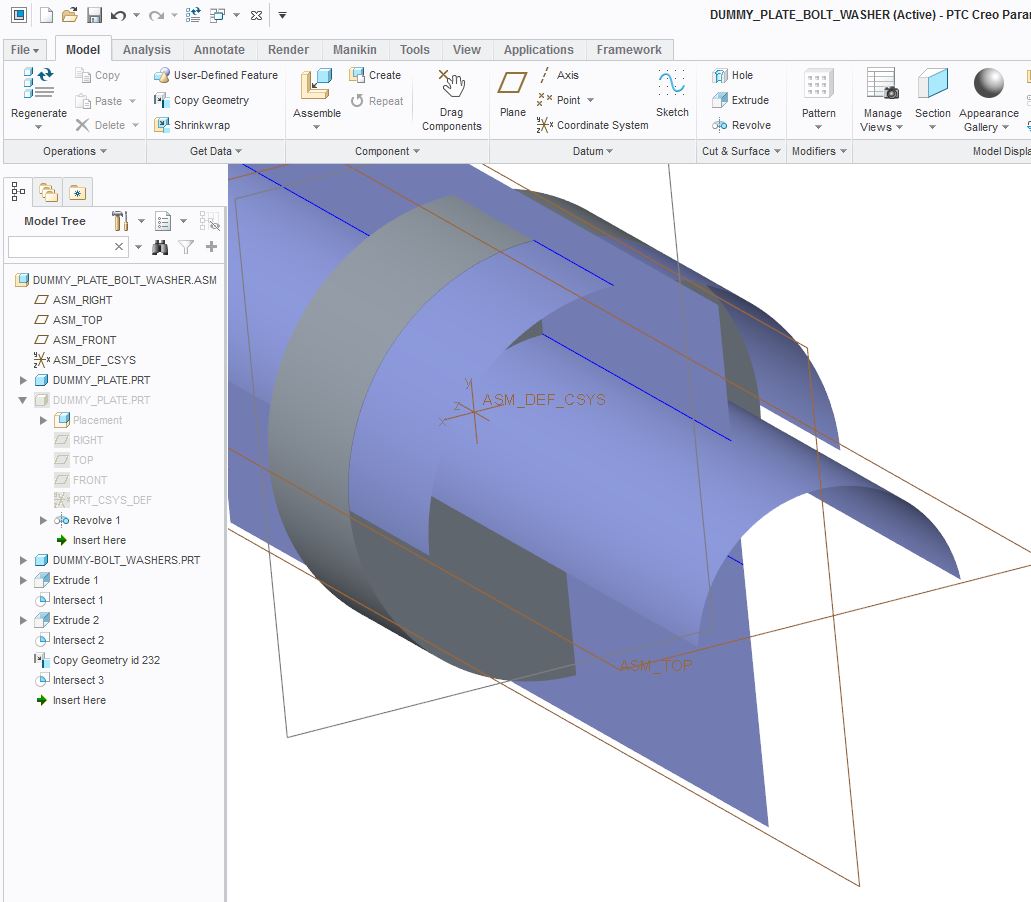
It's easy to make intersecting curves at the assembly level, as long as the surfaces were created at the assembly level (shown below). But if you want to copy-and-paste a surface from one of the components in the assembly and put that copied surface at the assembly level, you will have to use Copy Geometry. I copied part of the dummy plate surface and the copied geometry appears in the model tree as Copy Geometry id 232, and this surface is at the assembly level, which can be intersected with other surfaces at the assembly level.
assembly_intersecting_curves.JPG

    7 replies

    Apr 16, 2015 7:35 AM UTC

    Hi Steven and Doug,

    in fact what I didn't know was that I have to make that copy geometry for the surface deriving from the part. Indeed both surfaces must be at assembly level.

    Therefore one solution I have just tried is to: make a "Fill" on the datum plane sketching for example a rectangle + copy surface of the surface of interest of the other part.

    I was thinking there was a faster solution but anyway that's good, better than nothing.


    And, other question, is there a way to permanently hide sketches, curves, etc etc? because everytime I re-open the part they reappear.


    thanks

    bye

    Apr 16, 2015 9:23 AM UTC

    Tommaso Leati wrote:

    And, other question, is there a way to permanently hide sketches, curves, etc etc? because everytime I re-open the part they reappear.

    Hi Tommaso,

    Rather than using the 'hide' functionality, you should look into using layers. You can manually create layers and add entities to them; or with a little more work, you can create rules so that all curves are automatically added to a 'curves' layer, for example.

    Then hide the layers you don't want to see, and remember to 'save layer status'.

    HTH!

    Apr 17, 2015 7:40 AM UTC

    Hi Jonathan,

    thanks for your suggestion.

    bye