
Dec 16, 2016 1:52 PM UTC
Question

Re: Fix problem introduced in Creo 3 Creo Simulate fasteners and materials fail instead of being suppressed while in a simplified rep causing meshing failures and analysis running failures or to terminate and fail.

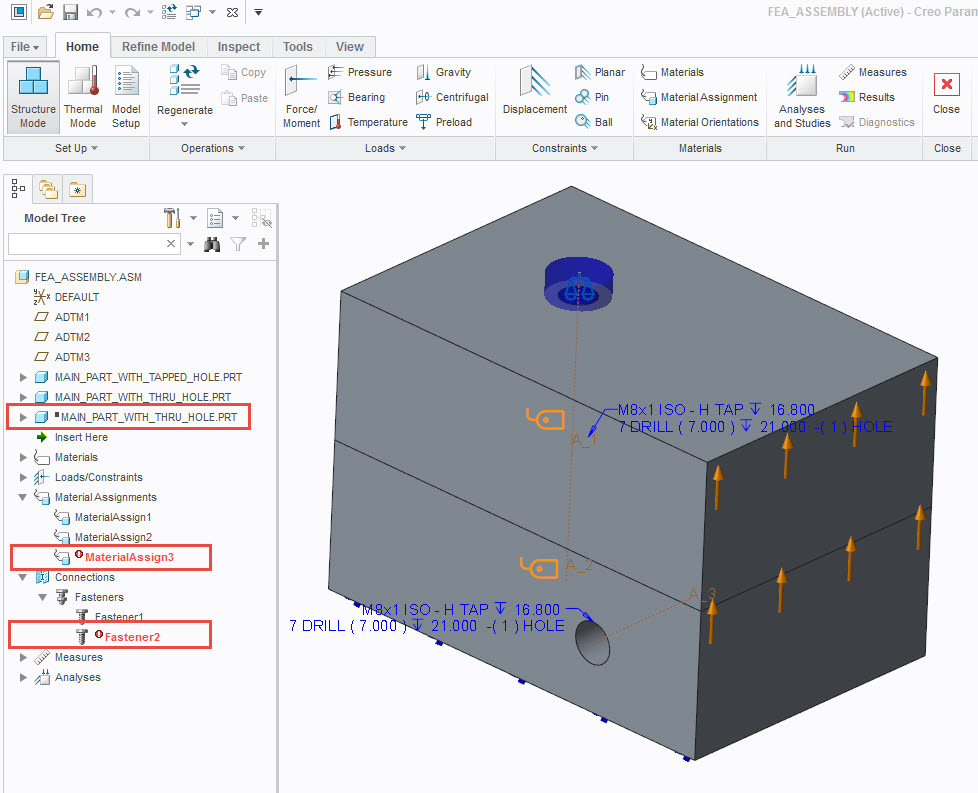
Need a SPR to restore functionality, but I voted up on the idea anyway.  I suppressed one of the components in Parametric before switching to Simulate, as shown below.  I didn't see the suppressed black box in your model tree for Creo 3.  Good find.
simulation_features.jpg

    2 replies

    Dec 16, 2016 5:17 PM UTC

    PTC have confirmed what i found last week.

    I hope to have a spr when i talk to ptc the first week in January When i get back in the office.

    Thanks,

    Don Anderson

    Jan 18, 2017 3:17 PM UTC

    Reference PTC Technical Support Case C13398407

    I had PTC look into this issue and due to me not being able to get back to the original I was not able to recreate the issue again.

    My understanding at this point is the following.

    Simulate features that fail due to components being excluded by a simplified rep will not be included when you create the mesh and will not be processed when you run the analysis.

    If you run into an issue where a previous assembly crashes Creo 3 but not Creo 2 when meshing and if you delete all of the failed simulate features that fail in Creo 3 and Simulate able to successfully mesh after doing this. Please open a case with PTC and reference the case number above.

    I will keep an eye open for any other assemblies that have this issue.

    Thanks,

    Don