
Mar 25, 2014 5:28 PM UTC
Question

Re: CREO 2.0: Creating surface/volume regions in subcomponents of assembly

I didn't have any problems adding a Surface Region at the assembly level. True, it places the surface at the component level, but you can add it in the assembly. I just added a Surface Region to the assembly below and put a load on it.
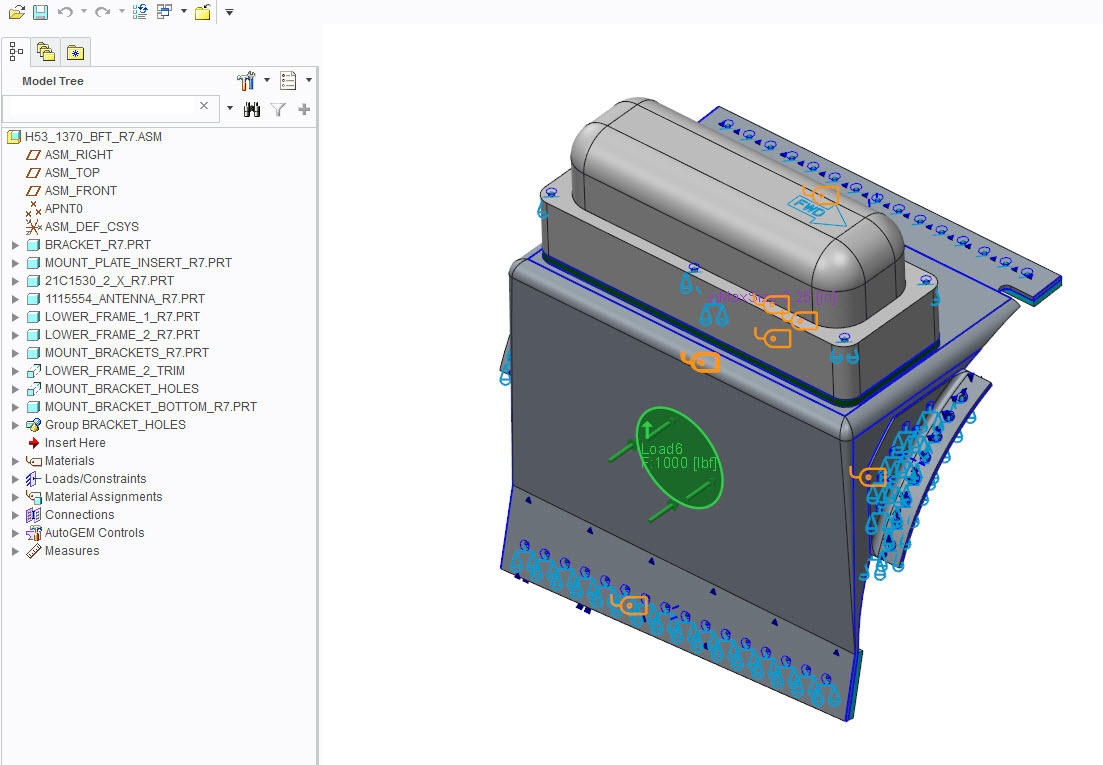
surface_region.jpg

    4 replies

    Mar 25, 2014 5:36 PM UTC

    I think he's running into system config issue (preventing external references) or while in assembly mode his setup is not pulling a license (floating license for a module) which it does while in part mode.

    Mar 25, 2014 6:01 PM UTC

    The fact that the references appear in the part file is likely interfering with the Windchill file management system in some way.

    Mar 25, 2014 6:02 PM UTC

    Excluding the fact that I can't even add these features at the assembly level (due to some miscommunication between Windchill and CREO), it's frustrating to me that the surface regions would be saved to the part file rather than the assembly. What if this same part is used in multiple assemblies with different loads or constraints? You'd need to add the separate volume/surface region for each place that it's used. This could get ugly, especially if the regions for different parent assemblies had coinciding surface/volume regions.

    May 12, 2014 12:57 PM UTC

    Jack,

    has the information from Mark hlped you figuring out, why you fail to create a volume/surface region?

    Regarding your desire to have regions created only for some instances of a part: In this case I can only suggest to create new models and use copy geometry to apply the geometry of the original models. These new parts are then used exclusively for your Simulation assembly and it doesn't matter that the regions will be in them instead of the assembly.