
Nov 2, 2016 8:08 PM UTC
Question

Hatch Marks in Section Views - Trouble Changing Colors

Community,

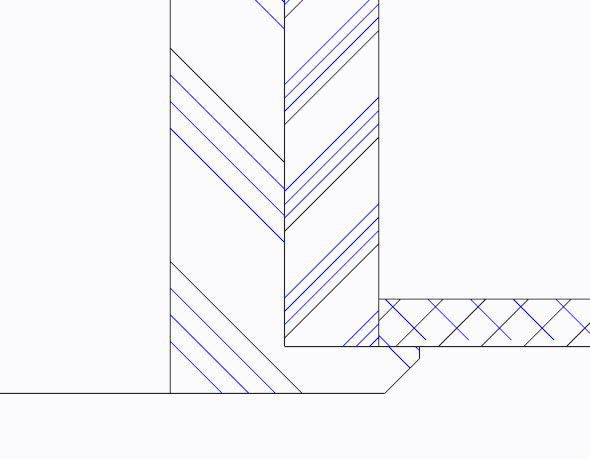
I've created a cross-section view on three components with hatch marks for aluminum and ANSI34 (plastic/rubber).  All the hatch marks are created in BLUE, by default.  When trying to change the hatch marks to BLACK, only half of the hatch marks for aluminum turn black, and one out of four per hatch set turn black for ANSI34, as shown in the below image.  What is the solution to make all the hatch marks black?  Thank you.
hatch.jpg

    4 replies

    Nov 2, 2016 8:30 PM UTC

    I think that 'letter color' (here, blue) is the correct color, but if you want to make the geometry color (here, black), you can.  When you are editing the hatching, see the section of the menu reading 'Add line, Delete line, Next line, Prev line'.  This lets you add (or here, manipulate) multiple lines making up the hatching pattern.  Use Next line to cycle to the next, and Line Style to change it.  If you want to make an all-geometry-color version of 'aluminum' hatching', for example, you could then Save that hatching style.  But I would be hesitant to do it, as I believe that letter color is the standard.

    Nov 2, 2016 10:44 PM UTC

    One thing that has been a disappointment is that after PTC bought Computervision (CV), they did not harvest the general purpose hatch/fill routines that CV had used in CADDS. Even before 1985 CV had better support for hatch/fill. Anything could be used to create hatch/fill. Soil, metals, plastic, and other conventional hatch/fill; even smiley-faces if I'd thought to do so.

    Pro/E, WF, Creo use multiple instances of simple line-crossing to generate the patterns, which is why it isn't easy (if even possible) to do a decent job of coordinating them to generate things like the copper pattern in this image: http://etc.usf.edu/clipart/76600/76648/76648_materialsym_md.gif

    As a result, as Matt points out, one has to work through the individual line generators for each hatch pattern.

    Nov 3, 2016 2:45 PM UTC

    Although it's been a long time coming, you will soon be able to create hatching with non-linear hatch pattern styles.

    This is coming in Creo 4.0 - due to ship next month.

    With this enhancement, Creo will now support the use of industry standard *.pat hatch pattern files - this is the same format used by AutoCAD.

    We will ship the software with an out-of-the-box selection of hatch patterns, but now that we're using the standard file format, you will be able to download and use any hatch pattern you find on the web, or you can create your own hatch pattern using any of the standard tools available on the web.

    Nov 3, 2016 4:50 PM UTC

    Yes, for many of us, it's been a long time. When did Rev 12 ship?