Feb 2, 2017 6:41 PM UTC
Solved

Drawing File to PDF - Edge Lines Vary

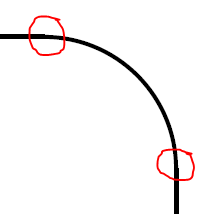
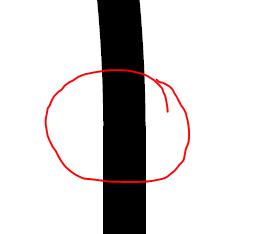
After exporting a drawing file to pdf, I noticed that the edge lines vary in thickness.  Is there a fix for this?



TomUAnswer
Feb 2, 2017 7:04 PM UTC

I can see something sort of similar, but only at certain zoom levels.  The size of the step seems to get smaller the further I zoom in.  Almost makes me wonder if it's a line thickness issue.  (If you turn off line thickness in Adobe Reader you can't see it.  Use "CTRL" + "5".)

What build of Creo are you on, what PDF reader are you using (including version), and are you willing to share the drawing?

4 replies

TomUAnswer
Feb 2, 2017 7:04 PM UTC

I can see something sort of similar, but only at certain zoom levels.  The size of the step seems to get smaller the further I zoom in.  Almost makes me wonder if it's a line thickness issue.  (If you turn off line thickness in Adobe Reader you can't see it.  Use "CTRL" + "5".)

What build of Creo are you on, what PDF reader are you using (including version), and are you willing to share the drawing?

Feb 2, 2017 7:29 PM UTC

It could still be the export data.  Something in the PDF is telling Adobe that one line is slightly thicker than the other.

Feb 2, 2017 8:38 PM UTC

I've seen this in PDFs from other sources when displayed in Reader and Acrobat. I think it must be a flaw in the Adobe display software. I would try taking it back through GSView and exporting it as a Postscript file to see what width was assigned, but I'll bet that there is no problem with the data.

Feb 2, 2017 8:42 PM UTC

Probably not a perfect test but I looked at the Postscript from printing.  For my example there is only one line thickness specified.  I also converted the PDF generated by Creo back to Postscript and likewise only found a single line thickness.  In my opinion this is a Adobe Reader display issue, not something actually in the PDF itself.