
Mar 13, 2013 2:30 PM UTC
Question

Creo Simulate - RAM Allocation for 64-bit Windows 7 Ultimate OS

For 64-bit Window 7 Ultimate OS, Creo Simulate 3.0 will only allow 16384 MB of physical memory.  It is recommended to allow the RAM allocation to be set to 192 GB, the maximum allowed for Windows 7 Ultimate.  For example, our HP Z820, Window 7 Ultimate, has 96 GB of physical memory, and we can only use 16.384 GB of it before a design study uses the swap space, slowing the overall run time.

The below snippet shows the message from Creo Simulate if you enter more than 16.384 GB.  In this example, 32000 MB was entered, and the OS is Windows 7 Ultimate.
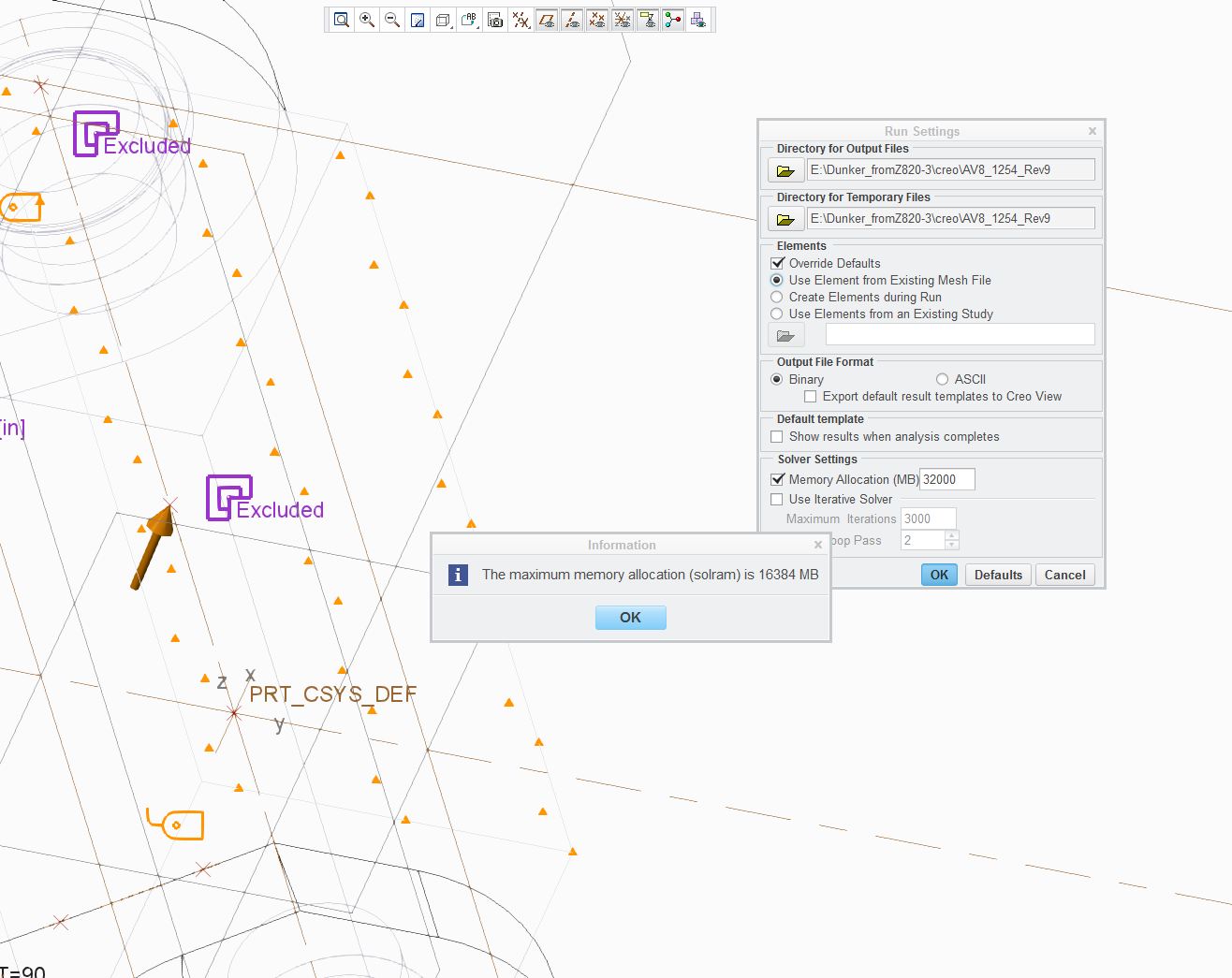
max_ram_allocation.JPG

7 replies

1-Visitor
Mar 14, 2013 6:44 AM UTC

Which exact operating system version are you using?

Is it maybe Windows 7 Home Premium x64? Then the limit is 16 GB (see http://en.wikipedia.org/wiki/Windows_7#Physical_memory) and it has nothing to do with Creo Simulate.

Mar 14, 2013 11:43 AM UTC

We have Windows 7 Ultimate with 96 GB of physical memory.  Creo Simulate will only permit 16384 MB of memory allocation, and I have already discussed this with PTC technical support.  I uploaded an example in my product idea of the warning you will receive if you attempt to allocate more memory than Creo Simulate will allow.  Thanks for the comments.

1-Visitor
Mar 14, 2013 11:51 AM UTC

You won and got my vote.

Don't forget to vote it up yourself!

Apr 2, 2015 4:53 PM UTC

Hi all,

Thank you for voting on this product idea.  As the product manager for PTC Creo Simulate, I closely monitor these ideas when planning the future roadmap for Creo Simulate.  This topic has gathered a number of votes which priorities its importance by the user community.

I understand that hardware has evolved over the years and systems used for analysis have more than 16 GB of memory.  As a result, it would be obvious that we should increase the memory allocation that can be used by PTC Creo Simulate.  However, to maintain our guidance on high-quality applications, any change related to memory allocation should not impact simulation performance. 

Our initial tests have shown that setting the Memory Allocation to 32 GB or higher has resulted in a small performance degradation.  For this reason, until the performance challenges can be resolved, the Memory Allocation limit will continue to be set at 16 GB.

PTC will continue to investigate and will plan to improve memory utilization for PTC Creo Simulate in a future release.  As a result, the future improvement will provide users with a higher memory allocation limit that would not impact performance.

Regards,

Mark Fischer

Apr 2, 2015 5:12 PM UTC

Increasing the memory allocation up to 32 GB is better than not making any attempt to increase it at all. What does your test show if it's increased to 24 GB, 28 GB, 30 GB, etc?

What is your "small performance" degradation?  Is it smaller performance than allocating disk space?  Using space on the hard drive to finish design studies due to lack of RAM is really a performance degrader.

Jun 4, 2015 6:08 PM UTC

I agree.

Mark,

Having the extra RAM with a slight degradation is better than not be able to run the simulation at all.

Feb 9, 2017 5:37 PM UTC

My penneth worth,

(I was certain that I had commented here before; clearly not).

We need multiple methods of managing the problem size. Bigger computers are not always better.

This is particularly important where, for what ever reason, the cpu usage is limited by solver design.

I'm not convinced that additional memory would be used efficiently and it would simply be filled with unnecessary elements.

Sub modelling is an effective method of reducing problem size.

I don't know what the trade-off is. Recode to use more memory and redesign those solvers that use only one core or offer another opportunity to reduce the model size further.

Of course, I'd like all three.

bfn

Charles