Sep 25, 2014 7:12 PM UTC
Question

Creo Parametric - Restore Leader With Text Flat to Screen

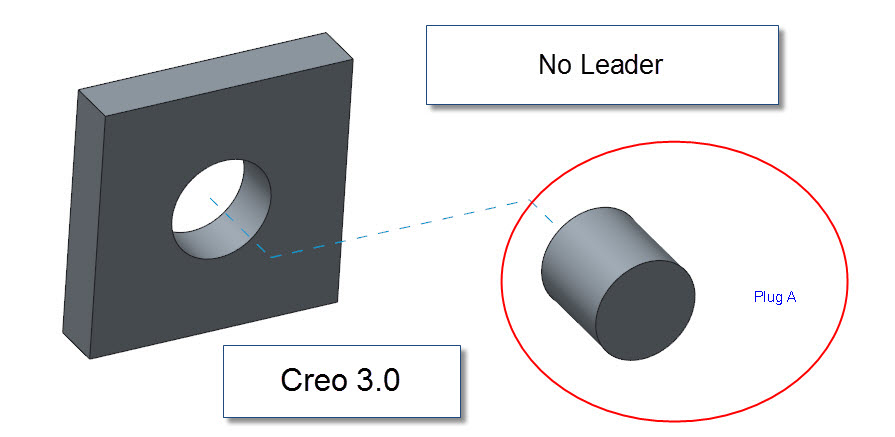
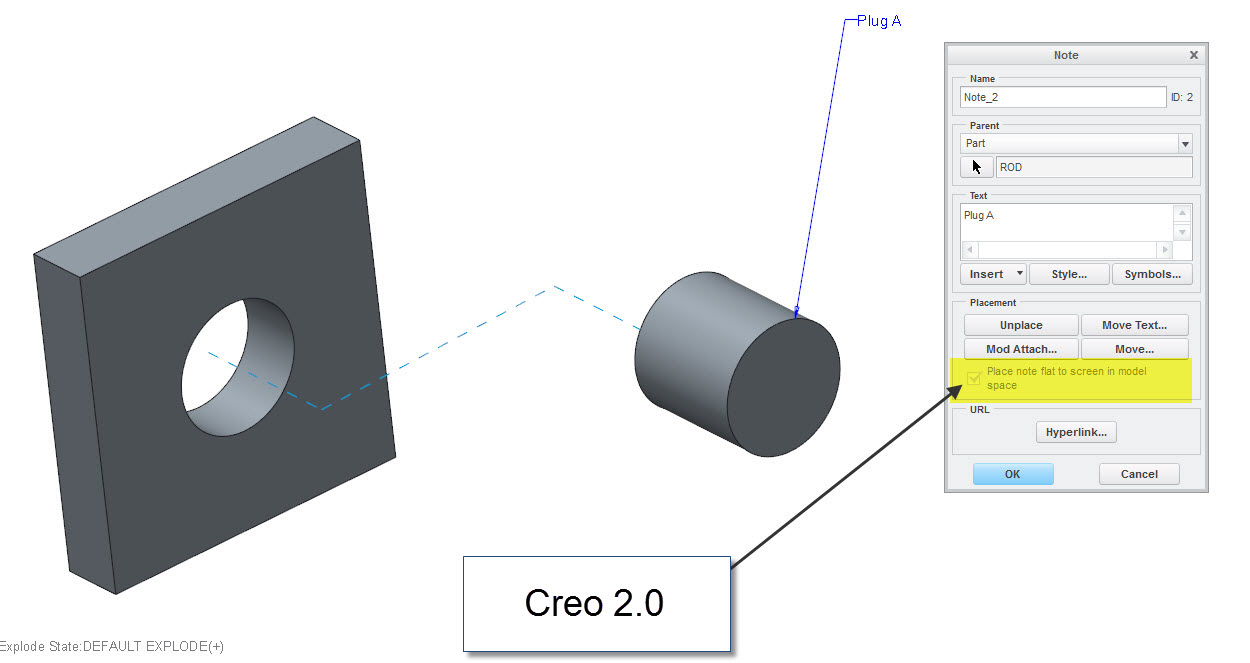
Product Development removed the capability in Creo Parametric 3.0 to create a new note flat to the screen and maintain the leader, verified by PTC tech support case 12167129.  Figure 1 is from Creo 2.0, and Figure 2 shows what has been removed.  This is recommend to be restored back in Creo 3.0, as this is a very nice feature to have for illustrated part breakdowns.  In Creo 2.0, the model can be rotated while the note stays flat to the screen and the leader remains attached to the part.
05.jpg

Figure 1

04.jpg

Figure 2

8 replies

Sep 9, 2015 8:27 PM UTC

I'm currently using Creo Parametric 3.0 M050, and this has still not yet been corrected.

Oct 20, 2015 5:54 PM UTC

SPR to fix this is still open and it was reported Dec 3, 2013, going on two years.

https://support.ptc.com/appserver/cs/view/spr.jsp?n=2852854&source=Case%20Viewer

Oct 20, 2015 5:58 PM UTC

Talk to Ben Perry‌.  He might be able to help you develop a use case that can be presented to project management.  It sounds like most ideas won't go anywhere until this happens.  (See Re: How Many Votes Does It Take?)

Oct 20, 2015 6:05 PM UTC

Actually, this shouldn't be a Product Idea, because it's a problem with the software.  I started it off as a Product Idea, but there is a SPR on it too (SPR 2852854) that was generated as a result of a tech support call, and the SPR is now almost two years old.

Oct 20, 2015 6:10 PM UTC

Don't feel bad.  I have an SPR that was created back in Wildfire 2 that still isn't resolved.  Over 11 years ago!

Fix the hole feature note behavior

Oct 20, 2015 6:49 PM UTC

The attaching leader line with text flat to screen works in Creo 2, it's just when Creo 3 came out, it somehow got corrupted.  You have a SPR that's over 11 years old...and I thought mine was old.

Oct 12, 2016 11:40 AM UTC

Haven't tried M100, but in M110 they brought back the Note Properties window.

Not as straightforward as it used to be, but you can now create a 3D note with leader flat to screen.

Firstly, add config option allow_flat_to_screen_note yes

Go to Annotate tab, activate Flat to Screen from the Annotation Planes, and create an Unattached note (all the others types are greyed out).

After the note is created, RMB on note > Properties and that will open the Note properties window.

Untitled.pngUntitled2.png

In there, click Unplace, tick the box Place note flat to screen in model space (it will become active once you unplace the note), and Place the note back in the model.

Lots of clicks but at least it's possible!

Oct 13, 2016 2:29 PM UTC

You need to Unplace the sketch and then it becomes active.