Nov 30, 2015 2:29 PM UTC
Solved

Creo Drawing Update

I know that when you update a model, it updates the drawing.  I haven't made drawings in PTC for a long time, however, I know this is suppose to work.  How can I update?



    StephenWAnswer
    Nov 30, 2015 5:08 PM UTC

    The config.pro option is AUTO_REGEN_VIEWS  YES/NO

    Yes for automatically updating drawing views based on model changes is the default option

    No delays update until the user regenerates the views manually - we use this due to large assembly drawings taking a LOT of time to refresh drawing views.

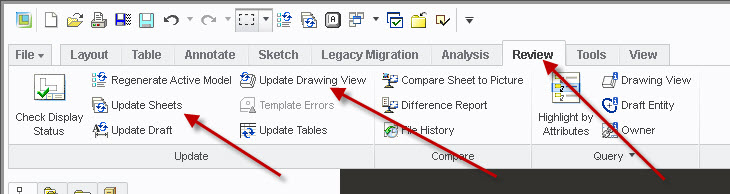
    The drawing view regen is located under the REVIEW tab

    UPDATE SHEETS to update current sheet(or all selected sheets)

    UPDATE DRAWING VIEW to update one view at a time (or multiple selected views)

    regen-views.jpg

    7 replies

    Nov 30, 2015 3:15 PM UTC


    There are a few possibilities as to why the drawing has not update...

    there is a configuration option to not automatically update the drawing views every time the model is changed,  this is a useful time saving setting when dealing with large assemblies or complex parts that take a long time to update every view... every time a change is made. So...

    The 1st thing I would do is in the drawing regenerate he model "CNTL G" If the drawing view updates to show the change then this is what is going on.

    if this does not solve the problem the I would verify that the model in the drawing is the same as the model that you changed. While in the drawing hit "CNTL O" ENTER ENTER. what model opened ?.


    StephenWAnswer
    Nov 30, 2015 5:08 PM UTC

    The config.pro option is AUTO_REGEN_VIEWS  YES/NO

    Yes for automatically updating drawing views based on model changes is the default option

    No delays update until the user regenerates the views manually - we use this due to large assembly drawings taking a LOT of time to refresh drawing views.

    The drawing view regen is located under the REVIEW tab

    UPDATE SHEETS to update current sheet(or all selected sheets)

    UPDATE DRAWING VIEW to update one view at a time (or multiple selected views)

    regen-views.jpg

    Apr 13, 2016 12:06 PM UTC

    Hi Stephen,

    does the option AUTO_REGEN_VIEWS  YES/NO work for updating sheets too?

    or is there an option for the sheets?

    thanks

    Tommaso

    Apr 13, 2016 1:26 PM UTC

    AUTO_REGEN_VIEWS  YES should keep the drawing (all sheets) always refreshed to the model.