
Jul 21, 2014 12:16 PM UTC
Question

Creo 3.0 Unite Technology Import Capability

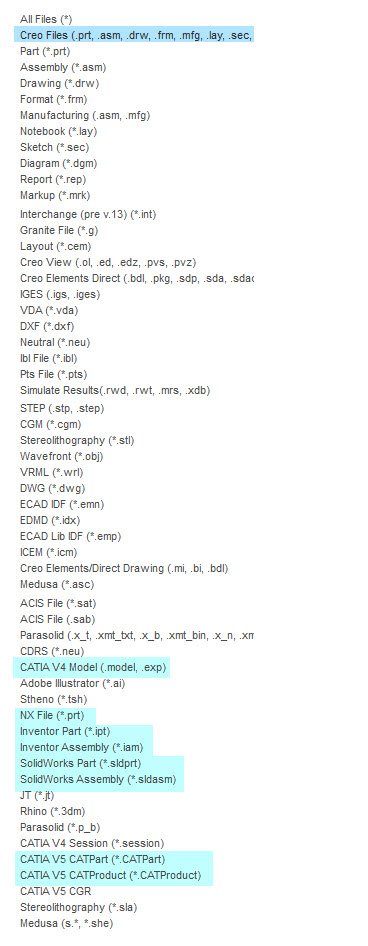
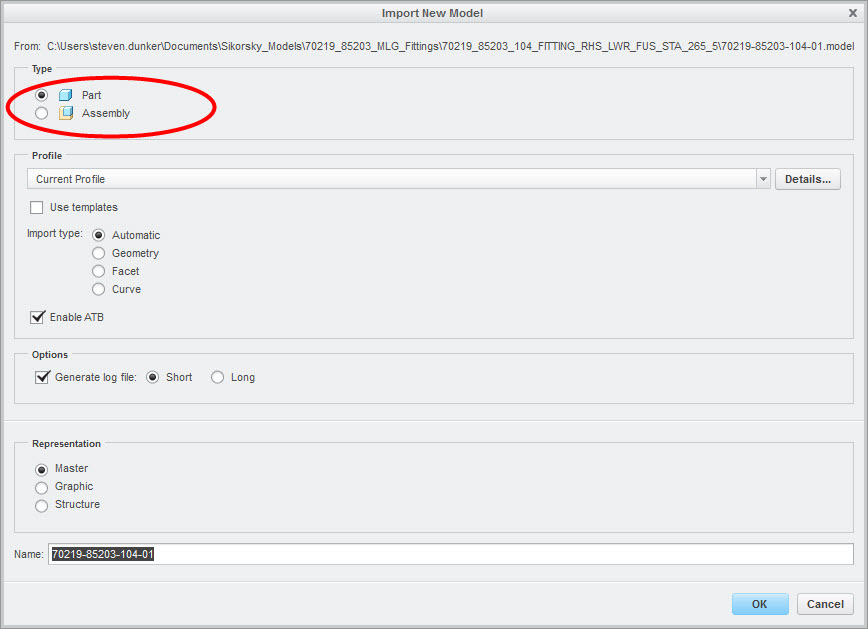
I got Creo 3.0 F000 up and running last Friday, and I must say that I'm impressed with the import capability. I imported two CATIA models (.model CATIA V4 and .CATPart CATIA V5) without any complications. I could import parts as well as assemblies. The open/import capability listing is shown below.
creo_3_import_03.jpg

creo_3_import_01.jpg

23 replies

Jul 21, 2014 12:19 PM UTC

Excellent..i saw the part you opened..

next M020 will open catia,nx,solidworks files

and the M030 we will be able to save as (at extra cost)..as a solidworks,catia,nx file.

Jul 21, 2014 12:34 PM UTC

the save as function would be and extension which is going to cost...

oh i just missed..M020 will import solid edge files also

Jul 21, 2014 4:08 PM UTC

Hey Steven,

I installed this version also and did not have the same positive results. Tried importing about 3 different file types. I tried the SLDPRT and SLDASM with no luck. Locked up my system. Also tried to import the inventor files also locked up my system. Do you have some sample files you have tried you can attach so I can try them? We have many parts and assemblies from many vendors and this would help us tremendously.

Thanks!

Buddy Hudson

Jul 21, 2014 4:45 PM UTC

which versions of solidworks and inventor are you trying to open?

there might be a limitation to the version which Creo 3.0 can open..

Jul 21, 2014 5:57 PM UTC

Hey Rohit,

Thats a goodpoint. Since a don't have any of those systems, I just went to the web and found some random files to test with. I did not note the versions.

@ Steven, what versions did you use of those types of files?

Buddy

Jul 22, 2014 7:07 AM UTC

Hi to all,

Save As native file command will generate file containing "dumb" geometry. Do not expect file containing construction features !

Martin Hanak

Jul 22, 2014 11:27 PM UTC

from this image it seems that it openend perfectly.

Jul 23, 2014 11:07 AM UTC

I tested it as well and I'm not as impressed as you are. Since I could import Solidworks files already in Creo 2.0 (ATM) the behavior in Creo 3.0 looks the same. It converts the Solidworks objects to Creo files, so when you save the Creo assembly where the Solidworks objects are inserted, new Creo parts and assemblies are saved as well. It shouldn't be like that. The objects from other CAD systems should keep their native format (if you don't change them within Creo) and no new files should be created.

Do I do something wrong? Is there a setting or something I've missed?

Thankful for help.

Tobbe

Jul 23, 2014 11:30 AM UTC

Tobbe,

you have to wait until PTC releases Creo Parametric 3.0 M020 (or higher ?).

F000

... is able to import Solidworks (+CATIA+NX), only ... it is not necessary to install foreign software

M020

... will be able to open Solidworks (no Creo part on the disk will be created), unfortunatelly nobody knows, how Open command will work...

Martin Hanak