
Aug 16, 2016 12:56 PM UTC
Solved

Assembly View - Default Orientation


After selecting Ctrl-D, the assembly will not go to the default orientation view, but rather it will show an end view. Also, after selecting the Default Orientation with the LMB, it goes to an end view.  Has anyone else experienced this?
    TomUAnswer
    Aug 17, 2016 1:57 PM UTC

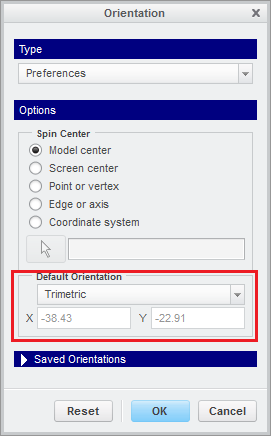
    CTRL+D is "Standard Orientation", not "Default Orientation".  That one is controlled by the orientation preferences and is not model specific.

    Can you please confirm that CTRL-D shows the same thing as the "Standard Orientation"?

    5 replies

    Aug 16, 2016 1:10 PM UTC

    The default orientation can be overwritten just like any other named view.  The only one that can't is the "standard orientation".  Just reorient it the way you want and then resave the default orientation.

    Aug 17, 2016 5:18 PM UTC

    When I went to orientation dialog that tom showed above, and I clicked user defined, it' gave me your orientation as my standard.

    What is your default orientation in the orientation dialog PREFERENCES?

    TomUAnswer
    Aug 17, 2016 1:57 PM UTC

    CTRL+D is "Standard Orientation", not "Default Orientation".  That one is controlled by the orientation preferences and is not model specific.

    Can you please confirm that CTRL-D shows the same thing as the "Standard Orientation"?

    Aug 17, 2016 6:31 PM UTC

    Now I'm confused.  The standard orientation cannot be overwritten (saved).

    Are you 100% sure you really overwrote it?

    Aug 17, 2016 1:59 PM UTC