Feb 26, 2014 6:47 PM UTC
Solved

.


Feb 26, 2014 9:16 PM UTC

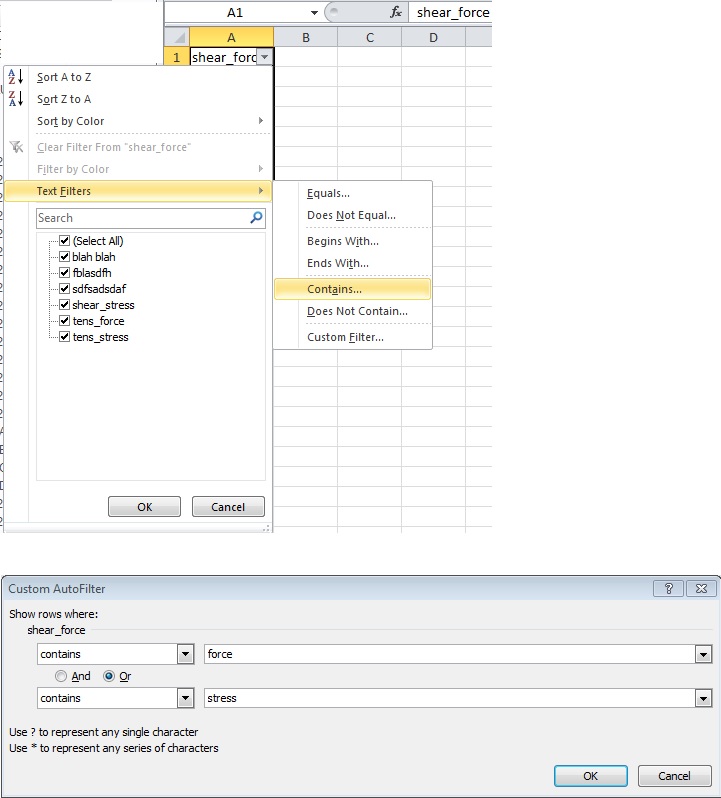
No need for a macro if you use filters. Highlight the test you want to filter, then click the filter button. Click the down arrow next to data and click on text filters. Create a custom filter as shown below. Then just copy/paste the filtered data into a new spreadsheet. You could probably create a macro to do this but it's quick without one.

filter_measures.jpg

2 replies

Feb 26, 2014 8:59 PM UTC

Steven,

I'm assuming you would want the axial force and shear force removed from column A and headings added to column B & C for Axial Force and Shear Force.

Could you upload a example csv file for me to play with?

Thanks,
Don Anderson

Feb 26, 2014 9:16 PM UTC

No need for a macro if you use filters. Highlight the test you want to filter, then click the filter button. Click the down arrow next to data and click on text filters. Create a custom filter as shown below. Then just copy/paste the filtered data into a new spreadsheet. You could probably create a macro to do this but it's quick without one.

filter_measures.jpg