
Dec 12, 2013 1:23 PM UTC
Solved

Footnote content issue

Hello every one,

Until today I did not have to use footnotes in my documentation and I have an issue. I used the <fn> tag to create my footnote and inserted the content as below with an ID. But in my PDF I do not have a footnote at the bottom of the page, I only get the small 1 beside the text.

Does anybody have a clue about what I did wrong? I am trying to find the way to insert the footnote automatically in the footer, but I can not find it.

Thanks,
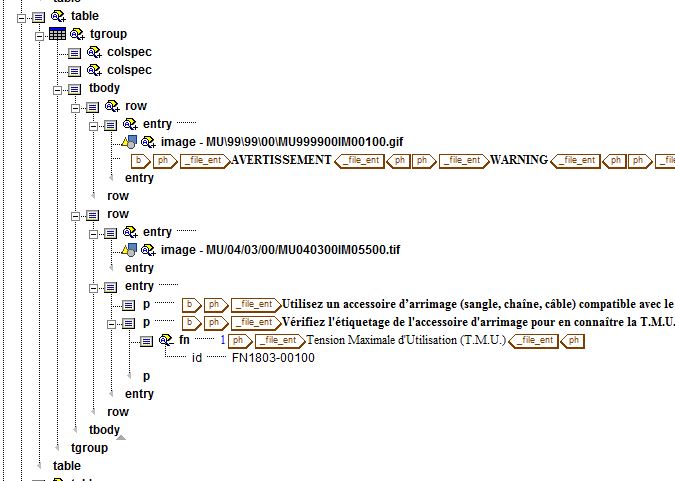
Capture+fn.JPG

bfriesenAnswer
Dec 12, 2013 1:52 PM UTC

Open help center and check out Creating and modifying a Hybrid model Footnote. This is where PTC support told me to check, when we had issues with our footnotes. Might be missing something in your style sheet.

Bryon

3 replies

bfriesenAnswer
Dec 12, 2013 1:52 PM UTC

Open help center and check out Creating and modifying a Hybrid model Footnote. This is where PTC support told me to check, when we had issues with our footnotes. Might be missing something in your style sheet.

Bryon

ctantAuthor
Dec 12, 2013 2:14 PM UTC

I just tried to create the full document PDF while I was checking at the help center and in the full document the footnote appears...

Apparently it did not show the footnote when I was generating the topic only or when I used Overview. I will have a look at the help center to see if I can improve it but it seems to work.

Thank you for your quick answer!