
Sep 19, 2012 9:24 PM UTC
Solved

change the order of attributes in dialog box?

Is there a way (within ACL?) to change the order in which attributes appear in the MODIFY ATTRIBUTES dialog box?

Hypothetical: There's a tag called CSN. It has 5 attributes: Chapter Number, Section Number, Unit Number, Figure Number, and Item Number (that's how you can find the part in the part catalog index elsewhere in the manual).

Based on the DTD, Arbortext knows the five attributes. So when I enter a tag, Arbortext wants me to populate those five fields. But I guess it displays the attributes in alphabetical order (not the way they appear in the text or the way users remember or speak them). This leads to mis-typing, errors and confusion.
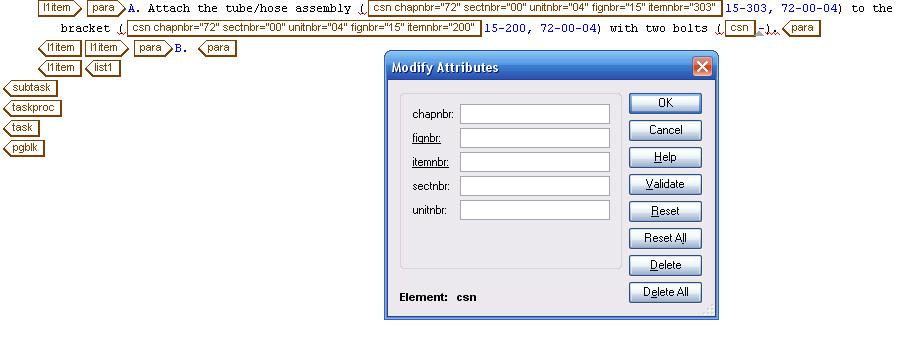
arbortext-example..JPG

in the DTD, the attributes are listed the way I want:

<!ELEMENT csn - O EMPTY >

<!ATTLIST csn

chapnbr NUMBER #IMPLIED

sectnbr NUMBER #IMPLIED

unitnbr NUMBER #IMPLIED

fignbr NUTOKEN #REQUIRED

itemnbr NUTOKEN #REQUIRED >

You can see in the image the attributes appear the correct way when the full tag is displayed, and they appear correctly in the generated text.

How can I change the order in which the attributes appear in the dialog box?

    Sep 20, 2012 4:52 PM UTC

    Hi Jason,

    It looks like your DTD is SGML, in which case there is a function in Editor called setmodifyattrssorted which you'll need to set to "off". By default it is set to "on" which makes Editor alphabetically sort attribute names. By setting it to "off", they should show up in the order they are defined in your DTD.

    Note that for XML documents, they are always alphabetized.

    setmodifyattrssorted={ on | off}

    3 replies

    Sep 20, 2012 4:52 PM UTC

    Hi Jason,

    It looks like your DTD is SGML, in which case there is a function in Editor called setmodifyattrssorted which you'll need to set to "off". By default it is set to "on" which makes Editor alphabetically sort attribute names. By setting it to "off", they should show up in the order they are defined in your DTD.

    Note that for XML documents, they are always alphabetized.

    setmodifyattrssorted={ on | off}

    Sep 20, 2012 11:05 PM UTC

    Super answer. I can modify that under TOOLS > PREFERENCES > ADVANCED for individual users. But where does it load those preferences on startup? Init.acl or some other file?

    Sep 27, 2012 2:12 PM UTC

    Hi Jason--

    If you want this to always be true for all users, you can create a file in your APTCUSTOM directory, in the init subdirectory, that sets it using ACL. In this case, it woudl just be the line Pushpinder listed:

    set modifyattrssorted=off

    If you already have a configuration file in APTCUSTOM/init, you could simply add this line to the existing file.

    --Clay