
Jun 9, 2016 4:30 PM UTC
Solved

Pop up windows open too tall for my screen. What do I do?

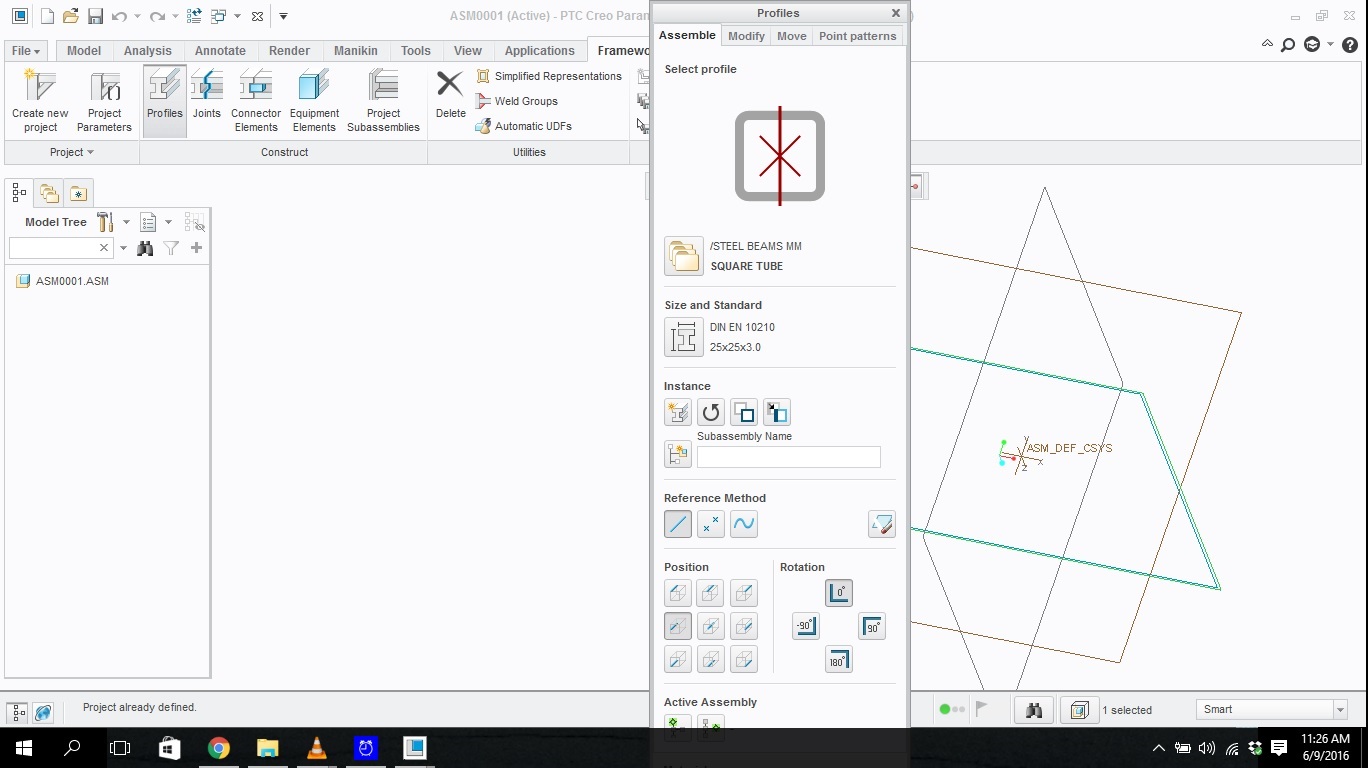
Any time I open a tool or click on anything that opens a pop up window (such as the options button or currently the profiles function with in framework) the window opens up so tall that I can not see the bottom making it impossible to use. I cant even re-size or drag the window upward to be able to see the bottom. How do I fix this?problem.jpg
PiefaceAnswer
Jun 13, 2016 1:42 PM UTC

This is a bug.  I think we diagnosed it to have something to do with Windows 125% font size.  Attempt to put your cursor in the last possible area before "OK"/"Cancel" and press TAB.  Hope you select "OK".  I think the only solution is to change Windows font size back to default (100%).  I have seen it occur recently (Creo 3, Windows 7) but could not get it to re-occur.  It used to always happen in the Model Properties form (File>Prepare>Model Properties).

17 replies

Jun 9, 2016 4:56 PM UTC

Hi Nick,

Is this happening no matter what you are using on your computer?

Best,

Toby

nhughesAuthor
Jun 9, 2016 5:29 PM UTC

Nope this is only happening in Creo.

Jun 9, 2016 5:36 PM UTC

Hi,

check screen resolution. It is probably too low to display large dialog boxes. If you are using notebook, you can attach external display to get bigger working area.

MH

nhughesAuthor
Jun 9, 2016 5:41 PM UTC

I believe I have the resolution as high as it will go. I have a 32 in tv hooked up as a second monitor and it still isn't displaying correctly...

Thanks for the suggestions though.

Jun 9, 2016 5:37 PM UTC

‌Buy a bigger monitor?

    Not helpful, I know....  I just couldn't help myself.

3-Newcomer
Jun 9, 2016 6:13 PM UTC

This looks like a Creo question, not a Community noe.  Toby Metcalf‌, should it be moved to one of the Creo areas?

I'd check your screen resolution.  Creo requires a 1280 x 1024 resolution or higher.

http://support.ptc.com/WCMS/files/161492/en/creo3_hw_notes.pdf

nhughesAuthor
Jun 9, 2016 7:14 PM UTC

My resolution is set to 1366 x 768.

3-Newcomer
Jun 9, 2016 7:52 PM UTC

That's your problem.  If that's the highest it'll go, there's nothing that can be done.

PiefaceAnswer
Jun 13, 2016 1:42 PM UTC

This is a bug.  I think we diagnosed it to have something to do with Windows 125% font size.  Attempt to put your cursor in the last possible area before "OK"/"Cancel" and press TAB.  Hope you select "OK".  I think the only solution is to change Windows font size back to default (100%).  I have seen it occur recently (Creo 3, Windows 7) but could not get it to re-occur.  It used to always happen in the Model Properties form (File>Prepare>Model Properties).

Nov 26, 2017 1:17 AM UTC

Thanks very much! This suggestion worked for me - on my 1920x1080 laptop display, the Creo-4 windows are correctly sized now. My font size was at 150% when the problem apeared after first install of Creo 4. I changed the text size to 125% based on your response so that my text size would not be too small for my other programs and it worked great - if anyone needs where to change the font size, please see the attached picture. Thank you again -


Feb 20, 2019 6:16 PM UTC
This is an old post but someone else might be able to use my suggestion. I ran into the same issue amd my available laptop resolution causes me to not have access to some of the bottom parts of pop up menus. I switched my layout to profile, was able to access the part of the window I wasn't able to previously, then switched back to landscape. It's a bit of a pain to navigate but it worked.