Mar 1, 2018 2:14 PM UTC
Question

constraint attach

Hello,

I use Creo 4, in the drawing

when I move a note or a bubble, there are always positioning constraints that appear, is there a way to disable this function?

Someone can help me ?


thanks
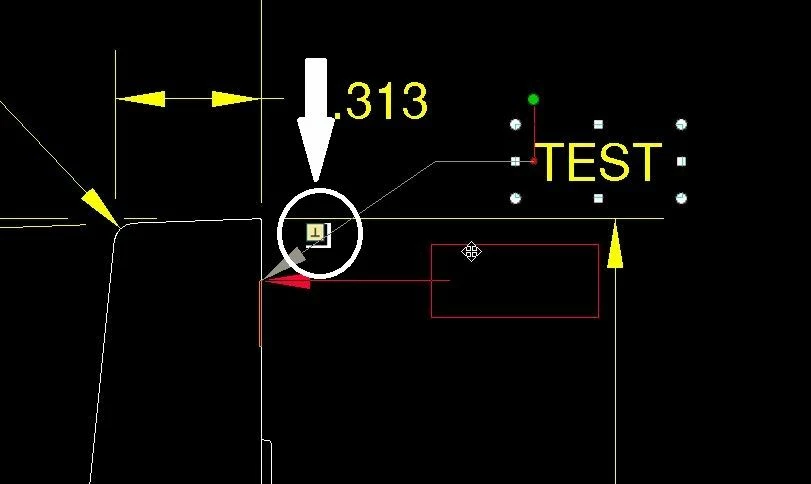
 

contraint_attach.jpg

9 replies

Mar 1, 2018 2:49 PM UTC
May 24, 2018 12:03 PM UTC

Why does the link to vote is disable ?

May 24, 2018 12:16 PM UTC

Are you logged in? I don't think you can vote if you are not logged in.

mgrondin1Author
Feb 26, 2019 4:25 PM UTC
 
to remove the constraints for bubble :
edit the attach, use a surface and change the arrow style to another simple arrow.
the simple arrow does not work well.
 
mgrondin1Author
Feb 26, 2019 4:33 PM UTC

It does not solve the problem, but it's an observation I made !

Feb 26, 2019 5:19 PM UTC

Another possible work around is by creating vertical and horizontal snap lines.

Have their intersection away from those pesky perpendicular or tangent snapping conditions.

Snap the corner of the leader to both lines, then move the lines into desired position by adjusting their spacing (can double click the snap line)

Jul 8, 2021 5:37 PM UTC

I found using surface reference selection instead of edge will stop the constraints.

Jul 9, 2021 12:40 PM UTC

This issue was fixed in May 2020 with the release of 4.0 M130 with the addition of controls  to disable and change the behavior of the constraints.


Check out this Idea post for more info: Option to disable/turn off annotation leader snapp... - PTC Community
