Jun 3, 2022 8:50 PM UTC
Solved

Visibility control of callouts and notes in Creo Illustrate 7.0?

Is there a way to control visibility of callouts and notes in Creo Illustrate 7.0?

agarlandAnswer
Jun 6, 2022 8:51 AM UTC

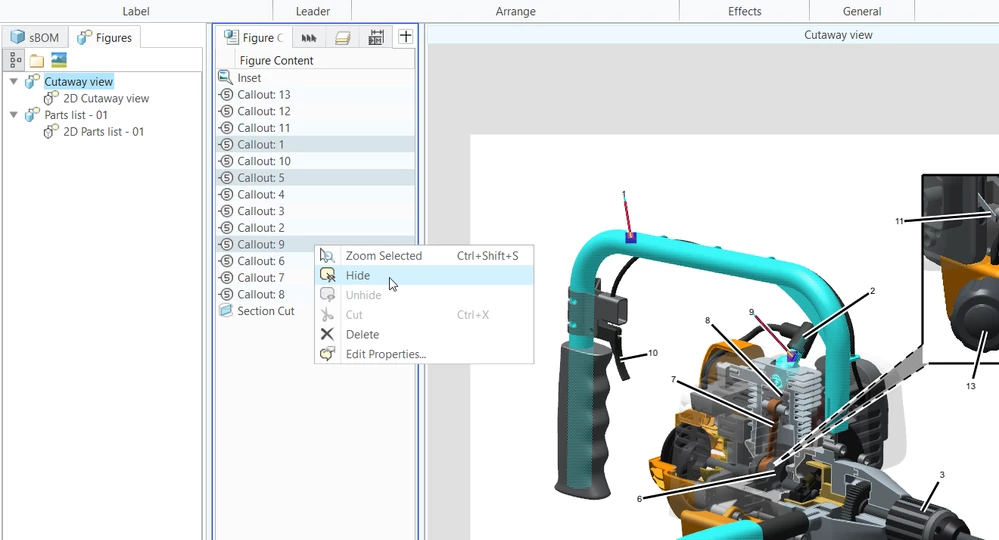
All figure content including callouts and notes are listed in the figure content tab of the upper data panel.

Right clicking on any item will give you a menu with options to show/hide/delete etc.

Hide callouts.png

4 replies

agarlandAnswer
Jun 6, 2022 8:51 AM UTC

All figure content including callouts and notes are listed in the figure content tab of the upper data panel.

Right clicking on any item will give you a menu with options to show/hide/delete etc.

Hide callouts.png

Jun 6, 2022 12:38 PM UTC
Thank you for your help. I was not clear on my question. How do you change the visibility through the animation timeline for callouts and notes?
I want to identify the objects at certain times in an animation and not all of the time. I presume It can't be done, because Record Content button is greyed out.
Thank you.
Jun 6, 2022 12:57 PM UTC

Yes, hiding a callout or unhiding while record content is active will add a visibility track to the timeline.

If the record content button is disabled, this is unrelated to the callouts.

Is it an animation or a sequence you are creating?

If it's a sequence, Record Content is disabled for the initial step which is really a thumbnail showing the state of the content at the start of the sequence.

I generally use that initial step/thumbnail to hide all annotations I don't want to see at the start, then unhide them in the relevant step.