
Sep 23, 2020 10:48 AM UTC
Solved

Creo View 5.1 - How do i make models open with "Expand 3D Thumbnails to Full Details" by default?
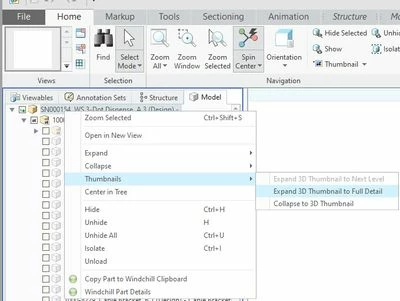
Expand 3D Thumbnail to Full Detail.jpg

Pretty much what the title says.

i've found the setting of how to turn a useless 'high-level'-3D thumbnail into something workable. Now how do i make it open my files like that by default?


While i'm here, how do i make Shaded with edges the default render mode?


Br, Jan-Willem
Sep 23, 2020 6:42 PM UTC

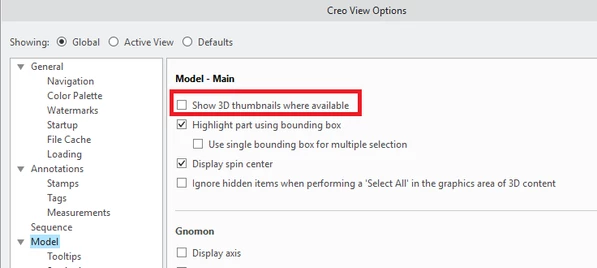
There is a setting to disable the use of 3D thumbnails while loading structures.  Here is a snapshot of the relevant setting (make sure it's unchecked).  Interestingly this is actually disabled by default so it seems that someone turned this on for you at some point.

romorrison_0-1600886435247.png


The ability to set a default render mode is actually being added in Creo View 7.1 which is planned to be released in December this year.


Hope that helps!


2 replies

Sep 23, 2020 6:42 PM UTC

There is a setting to disable the use of 3D thumbnails while loading structures.  Here is a snapshot of the relevant setting (make sure it's unchecked).  Interestingly this is actually disabled by default so it seems that someone turned this on for you at some point.

romorrison_0-1600886435247.png


The ability to set a default render mode is actually being added in Creo View 7.1 which is planned to be released in December this year.


Hope that helps!


Sep 24, 2020 7:11 AM UTC

Seems i had misunderstood what Creo means with a 3D Thumbnail.

The setting you suggested yielded the required result, thank you!.

I'm looking forward to Creo View 7.1.