
Nov 20, 2017 5:41 PM UTC
Question

Where did the Model Datum feature go in Creo 4.0

Hey guys,


another bumer. We updated the creo to 4.0. I used a Model Datum feature to set up the Datum Planes on my views.
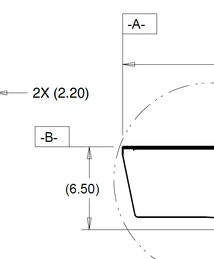
11202017_1.png

And now in Creo 4.0 its gone. And I can't find anything on the update or what substitude can I use. I am ready to draw it as a skets by now. But there should be some way. Please help!

Thank you.

6 replies

Nov 20, 2017 6:01 PM UTC

Creo 4 has moved to a new type that no longer uses a Datum feature, instead it uses geometry references to place the DFS (Datum Feature Symbol). Creating them new seems to be pretty easy and much more straight forward than the previous method.

Here is some info on it https://community.ptc.com/t5/Model-Based-Enterprise-Committee/Datum-Feature-Symbols-in-Creo-4-0/ba-p/444554. You can also probably find some videos on YouTube.


Conversion of legacy drawings to the new type is where the difficult part may be. Decisions will have to be made regarding if you want to convert the old style or leave them as they are. I've attached a couple videos and a PDF on that.


pvnAuthor
Nov 20, 2017 6:06 PM UTC

What if I only need to add this in the drawing? 

To put it bluntly I only need to add this block to keep the concistency among our companie's drawings.


I never saw design engineers adding tolerance and datum information in the 3d model. This is extra work for me to do it in the model and then detail it on the drawing again.

Nov 20, 2017 9:10 PM UTC

If you are just looking for the datum plane identifiers, just type them in a note using BOX function.

You can actually make all your GD&T using notes in the box function

datum-note.jpg

pvnAuthor
Nov 20, 2017 9:23 PM UTC

Thanks Stephen, you rock!


this is a good work around 🙂


But there's no dimensioning of the sketches, right? I used to use it in other software from time to time.

Nov 20, 2017 9:33 PM UTC

No, sketching in drawings is not good for much of anything.