Feb 8, 2018 10:08 AM UTC
Question

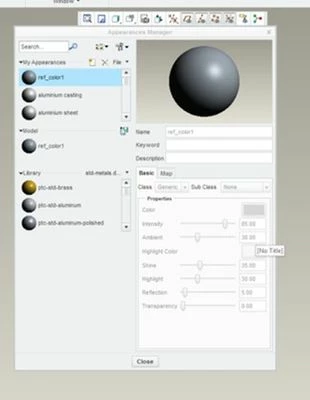
what is config option for control My appearance pallate default Name and Thumbnails

what is config option for control My appearance pallate default Name and Thumbnails. need to open this setting as default open in creo

Picture1.jpg

5 replies

Feb 8, 2018 12:06 PM UTC

I use Creo 2 and in my start directory there is a file called "appearance.dmt" which defines the different appearances I see when I'm looking to set them for a model. I believe I wrote the file directly from the appearance manager. I defined a bunch of appearances and gave them names, then once I had all the ones I wanted, I saved them, etc. Hopefully that is what you are asking.

I'm not using a config option to load this file, but there is a parameter called "global_appearance_file" that can be set. If you peruse the "Colors" section of the config options there are a bunch of different settings available, maybe something pertinent.

Jun 6, 2019 6:25 PM UTC

Thanks - I had a heck of a time trying to figure out where it was looking for My Appearances.  

I appended and saved my appearances to my "Working Directory" and called it appearance.dmt.

Now when I start Creo it loads my appearances automatically.  

6-6-2019 1-27-26 PM.jpg

Jun 6, 2019 6:30 PM UTC

We have a network installed appearance.dmt file that all users may use. It is loaded from the config.pro setting.

I have found since Creo2, that the system may not find the file the first time, so we have to manually navigate to the location and load it. After that it is no problem finding the file and loading at startup.