
Jun 18, 2015 4:32 AM UTC
Solved

Unable to edit imported IBL file in 3.0

Maybe I have a setting wrong, but in Creo 2.0 I was able to EDIT an ibl file after it was imported.  It was brought up in a notepad window and I could directly edit numbers as needed.  In 3.0 the option seems to have disappeared.  The file button is grayed out.
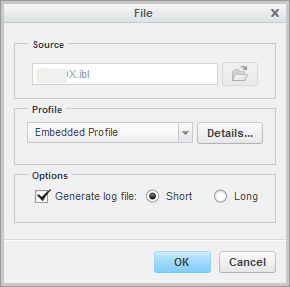
2015-06-17_21-31-19.png

    Jun 18, 2015 5:23 PM UTC

    Wiliam,

    You will get specified option when editing curve which was created using "curve from file". Command "Curve from file is not available in ribbon, you can search that in command search.

    1. Create a part

    2. Search for "Curve from file"

    3. Select Coordinate system

    4. Select *.ibl file > Open

    5. Select Feature "Curve from file" > Edit Definition > Curves > Done AND you will get your options to edit curves.

    3 replies

    wwalshAuthor
    Jun 18, 2015 4:05 PM UTC

    This is what it looks like in 2.0.  When you right click on the feature, the following menu came up.  You can then select "edit file" and the file is opened with notepad or other text editor.

    6-18-2015 8-57-51 AM.png

    Jun 18, 2015 5:23 PM UTC

    Wiliam,

    You will get specified option when editing curve which was created using "curve from file". Command "Curve from file is not available in ribbon, you can search that in command search.

    1. Create a part

    2. Search for "Curve from file"

    3. Select Coordinate system

    4. Select *.ibl file > Open

    5. Select Feature "Curve from file" > Edit Definition > Curves > Done AND you will get your options to edit curves.

    May 4, 2018 11:19 AM UTC

    Hello, is there a way we can edit this .ibl file without copying and pasting the contents of the text editor? During editing, I tried File-> Open-> Select file -> Save, but the new file doesn't get saved after clicking on 'Done'. An alternative way to edit the file would really be helpful.


    Thanks in advance.


    Regards,

    Aniket Pandit