May 27, 2017 5:15 AM UTC
Solved

Two arrow with difference style in one dimension line

Hi,

I am look forward to express a dimension line with two difference arrow type styles. Just like below photo, one end is standrd arrow and other end is dot, it is possible in Creo 2.0?

All my try show only one type style, boh standdrd arrow, or both dot, it is impossible to mix arrow and dot. thank you in ahead and have a nice weekend.
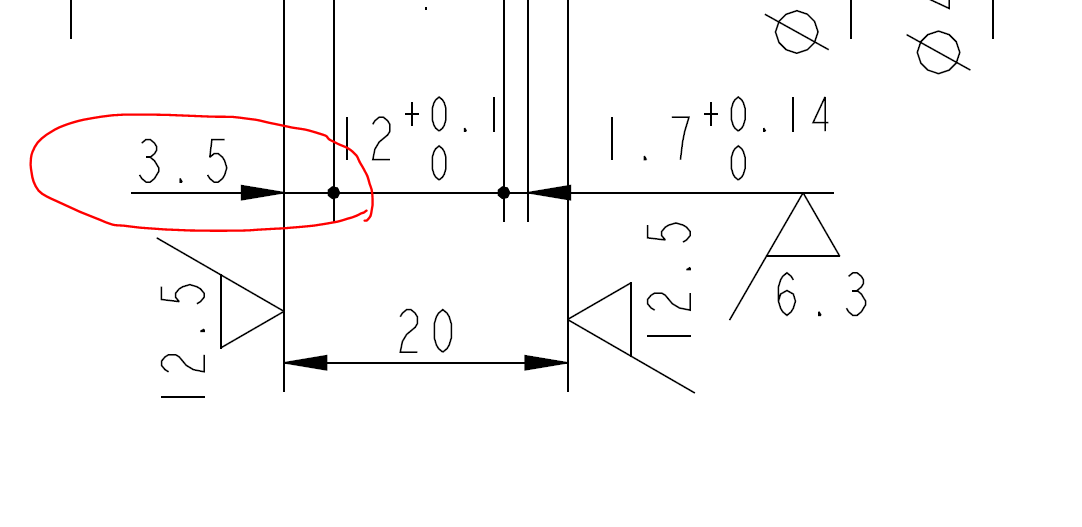
Dimension line with differerne ends style.PNG

Best reagrds, Hongjie

StephenWAnswer
May 27, 2017 12:55 PM UTC

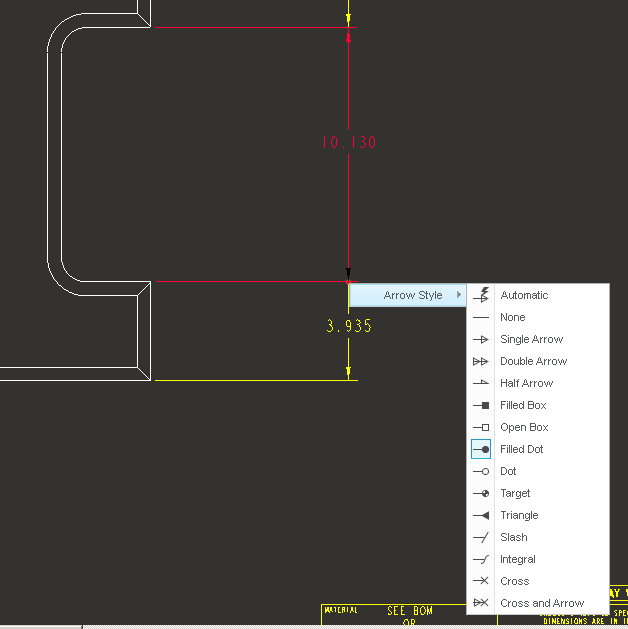
In Creo 3, if you select the dimension and then hover the mouse over the arrow, right click, you can change the arrow on one side only.

I don't remember if it works like that in Creo 2, you'll have to try it.

4 replies

StephenWAnswer
May 27, 2017 12:55 PM UTC

In Creo 3, if you select the dimension and then hover the mouse over the arrow, right click, you can change the arrow on one side only.

I don't remember if it works like that in Creo 2, you'll have to try it.

May 29, 2017 6:59 AM UTC

Creo 2.0 M200 is the same method.

Only pop-up menu looks a little bit different...

Milan Bonka

HongjieAuthor
Jun 5, 2017 3:42 AM UTC

Hi Milan

it work in my Creo 2.0, M240, thank you.

HongjieAuthor
Jun 5, 2017 3:46 AM UTC

Hi Stephen,

pre choice the dimension and hove to find the arrow disappear( need a little patinet)  then right clik to show arrow style promt.

thank you veru much!

Best reagrds, Hongjie