
Dec 2, 2017 8:23 PM UTC
Solved

Trouble during Extruded Cut

Hi everyone,

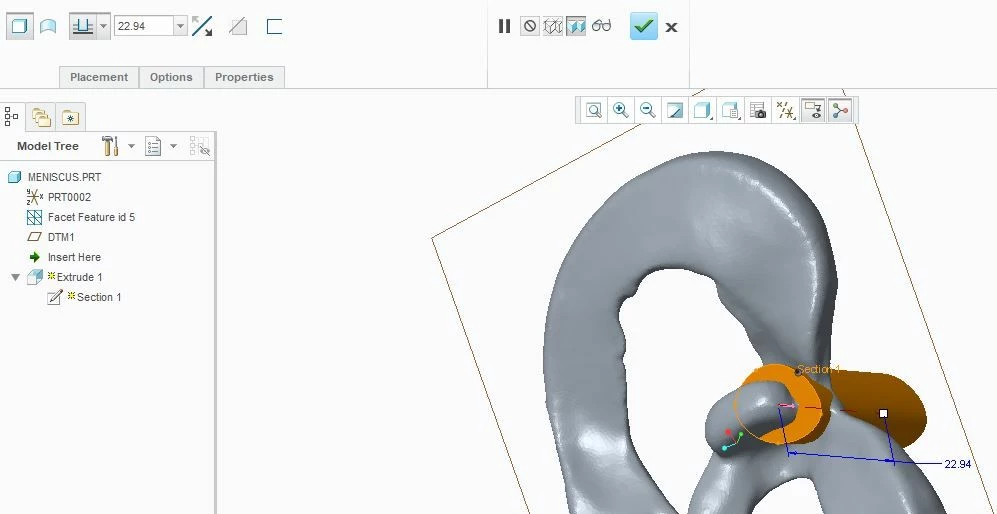
I want to split one part into two using creo. I aimed for extruded cut to do so. When I sketch and press extrude, the extruded cutting option remains inactive. It could not be selected. I would be very thankful if anyone helps me out with this.menisci.JPG
3-Newcomer
Dec 4, 2017 8:33 PM UTC

You need solid or geometry before you can make a cut. Facet geometry is neither solid or surface.  You'll need to uise something like the Reverse Engineering Extension to make solid or surface geometry out of your scan data first.

4 replies

Dec 2, 2017 9:18 PM UTC

Hi,


Facet geometry is special kind of geometry, you cannot combine this geometry with standard Creo features.


I am not sure what to do ... maybe you can save your part as shrinkwrap and apply your modification in this new part.

Dec 4, 2017 9:23 PM UTC
Thank you
3-Newcomer
Dec 4, 2017 8:33 PM UTC

You need solid or geometry before you can make a cut. Facet geometry is neither solid or surface.  You'll need to uise something like the Reverse Engineering Extension to make solid or surface geometry out of your scan data first.

Dec 4, 2017 9:22 PM UTC
Thank you for your reply. I did it using geomagic studio 12. I simply removed the things which were not required in the point cloud data that I obtained from 3d scanning.