Aug 29, 2023 8:43 AM UTC
Solved

Tracking-down a circular reference in Creo 4

Hello,

How to track-down a circular reference in a component inside an assembly?

I'm using Creo Parametric 4 M150
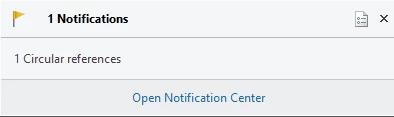
 

ELDAFRAWY_0-1693298483960.png


StephenWAnswer
Aug 29, 2023 10:46 AM UTC

Creo generates a text file in your working directory with the extension .crc that gives information on the circular reference.

Or

Use the reference viewer in the assembly and it will show the circular reference also.

3 replies

StephenWAnswer
Aug 29, 2023 10:46 AM UTC

Creo generates a text file in your working directory with the extension .crc that gives information on the circular reference.

Or

Use the reference viewer in the assembly and it will show the circular reference also.

Aug 29, 2023 10:55 AM UTC

If you look in the directory where you are working, you'll notice that whenever Creo finds such circular references it writes a file with the extension ".crc". That file will list all the offending features that comprise the circular reference. Hopefully the information provided in the file will be helpful - if I remember correctly it references Feature ID numbers.

Aug 29, 2023 1:59 PM UTC

As mentioned by @StephenW , the reference viewer is the tool for this. These snapshots are from part mode, but it works the same way in assembly mode.


tbraxton_0-1693317322392.png

tbraxton_1-1693317336178.png
