Jan 5, 2020 3:57 AM UTC
Solved

Trace sketch image problem
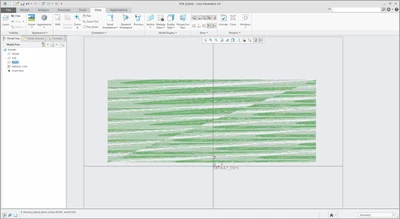
problem.png1.png


I'm trying to trace an image in creo. But when I import the image, the image appears to be in this distorted patterned layout. The right image is what I want to import. Does anyone know what's wrong?


Image is in PNG

Jan 6, 2020 2:29 PM UTC

@nwb10 


ok, with this option slight delay is expected...  in that case you may need to check the machine details at https://support.ptc.com/partners/hardware/current/support.htm 


Possibly this is not a supported graphics card to work with Creo. 

You may try below options, instead of earlier one.. if that helps. 

 enable_opengl_fbo no

enable_opengl_vbo no

enable_opengl_shader no

12 replies

Jan 6, 2020 1:50 PM UTC

@nwb10 

Image attached to post is working for me correctly.. possibly a graphics issue. Try setting config option graphics as win32_gdi

nwb10Author
Jan 6, 2020 2:14 PM UTC

That solved the problem! However, I also noticed some lag.


I did some searching and apparently win32_gdi does not use graphics card? I'm running a GTX1050 and it is up to date, do you happen to know which settings I can tweak to resolve the issue? Currently all settings are at default.

Jan 6, 2020 2:29 PM UTC

@nwb10 


ok, with this option slight delay is expected...  in that case you may need to check the machine details at https://support.ptc.com/partners/hardware/current/support.htm 


Possibly this is not a supported graphics card to work with Creo. 

You may try below options, instead of earlier one.. if that helps. 

 enable_opengl_fbo no

enable_opengl_vbo no

enable_opengl_shader no