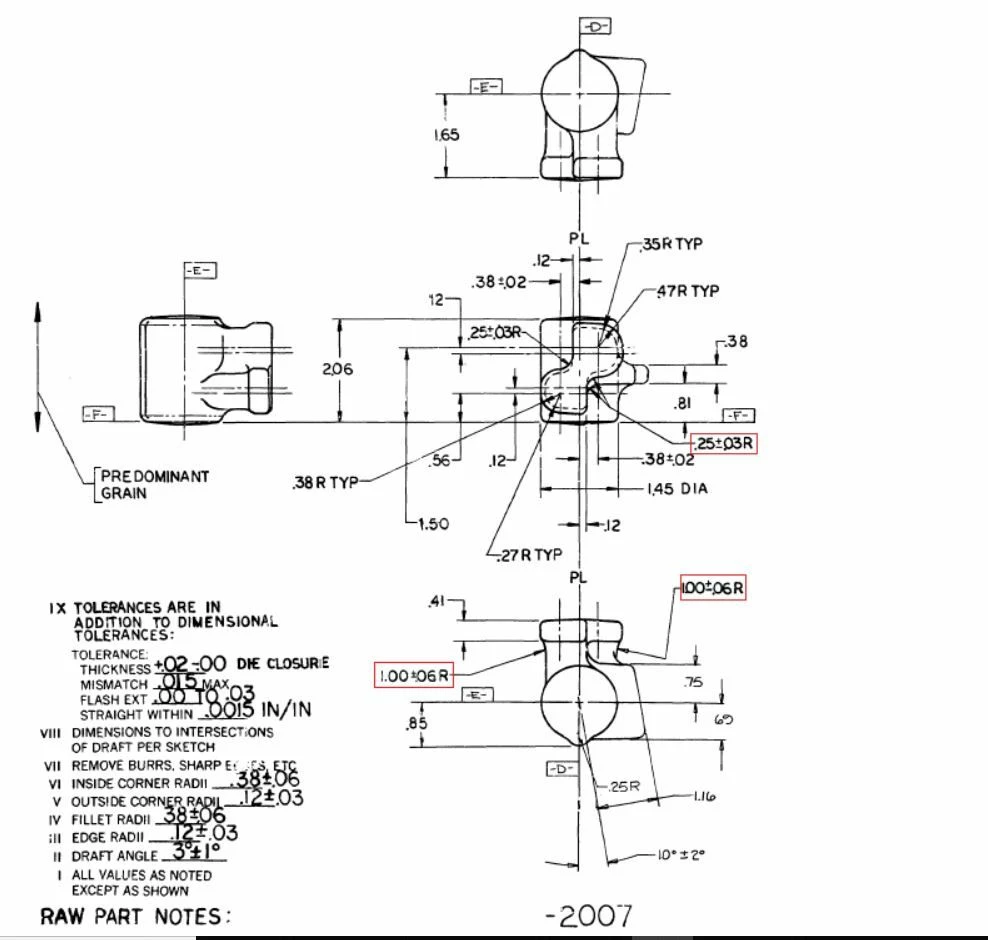
I was able to recreate drawing. The 1.00R was the most difficult. The transition in the corner had to be manually created after ending it at the end of the large radius.
Create 1.00R with stop at reference transition.
Project curves onto surfaces, create boundary blend and solidify.
This is quite typical of conversions from manually drafted components. We have the benefit of endless (nearly) accuracy that was not possible by hand drafted methods.
Draftsmen were highly skilled but when it comes down to things like fitting a radius that is 1.00 inch or is it 0.99 that fits they would be able to draw it because the gap at that scale is not perceptible. I suspect if you modify the rad slightly smaller it will work for you.
Yup! Although, sometimes replace "benefit" with "curse".... 😉
This may also have been something that could have been solved with LOWERING absolute accuracy...if absolute accuracy was used at all. Don't remember if that was brought up...
Windchill Satisfaction Survey
Help shape the future of Windchill. Take our 5-minute survey and share your feedback.