
Jun 12, 2014 7:53 PM UTC
Solved

Symbol with leader

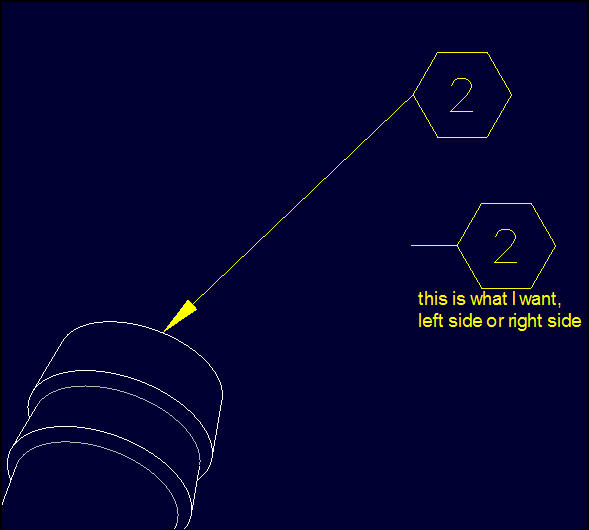
I've created a symbol with variable text that our department can use in future drawings. Often its placement is "free", but sometimes we will want to use a leader. So I defined a left and right point for leaders.


I would like a bit of an elbow in my leader, rather than having the leader line go straight to the symbol like the pic below. Under "Attributes" it has a check box "Allow Elbow", but... it doesn't. It's almost as though Pro Engineer is promising something it doesn't deliver. Who'd have thought?


This is 5.0.
 

gward-+2014-06-12+15-51-09.jpg

Jun 14, 2014 12:16 AM UTC

Grahame,

As Antonius mentioned, one option is to add groups in symbol and second option which you can try is Allow Elbow for Symbol Attributes (As shown in video). After placing such symbols, to allow elbow, hover the cursor at elbow location (Cursor will convert to horizontal, instead of Cross) and drag.

6 replies

Jun 13, 2014 12:31 AM UTC

I would have hoped there was an easier way.

You can draw in the lines and use them in selection groups.

You then assign origins for left and right leaders.

Jun 13, 2014 5:08 PM UTC

Ugh. Thanks.

Jun 14, 2014 12:16 AM UTC

Grahame,

As Antonius mentioned, one option is to add groups in symbol and second option which you can try is Allow Elbow for Symbol Attributes (As shown in video). After placing such symbols, to allow elbow, hover the cursor at elbow location (Cursor will convert to horizontal, instead of Cross) and drag.

Jun 14, 2014 12:37 AM UTC

So -that's- what that means