Nov 1, 2017 9:57 PM UTC
Solved

Sweep profile editing


Hi guys,


I can't editi the profile of the part I modeled. I want to adjust the radius, but it behaves funny. Plus I can't even delete this line to redraw.

Does it mean I have to redo the part?
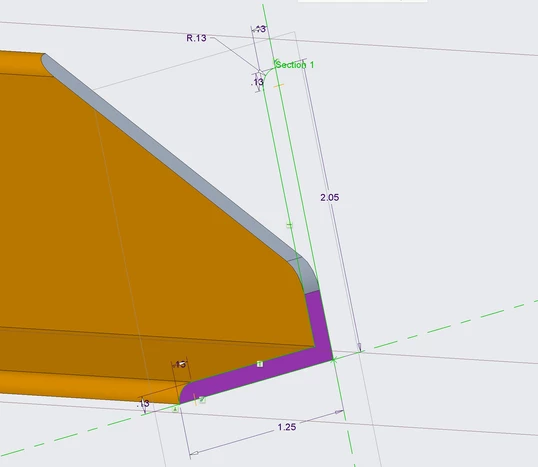
 

11012017_1.png


Thank you for your help

Nov 6, 2017 5:57 AM UTC

Doug is right.  In order to edit the sketch of certain feature types, you must edit the definition of the root feature to access the sketch.  Sweep is one of these.


As to deleting exiting elements in sketches, take a look at the RMB-Replace option.  You can replace a line with a new or different line, for example.  The original line will be deleted and the selected line remains.  This also tries to maintain relations throughout your part/asm in a from-to manner wherever possible.

7 replies

Nov 2, 2017 4:25 AM UTC

May be you have a mirror of this feature. If yes then try to delete the mirror feature and then edit the sketch.

pvnAuthor
Nov 2, 2017 3:47 PM UTC

No. There's no mirror feature. When I right click on the Sweep 1 - Section 1 it doesn't give me an option to edit definition.

Is that just a specifics of the Sweep in Creo?


11022017_1.png

3-Newcomer
Nov 3, 2017 3:46 PM UTC

It's hard to diagnose the part without access to it.


However, I don't believe you can access the sketch of a sweep (other than editing exiting dim values) directly from the model tree.  Right click on the sweep itself and then click the sketch button on the sweep dashboard to access the sketch.
