
Oct 26, 2017 3:56 PM UTC
Solved

Surfacing - Maybe this has been answered before but I cannot find it.

Hello all,


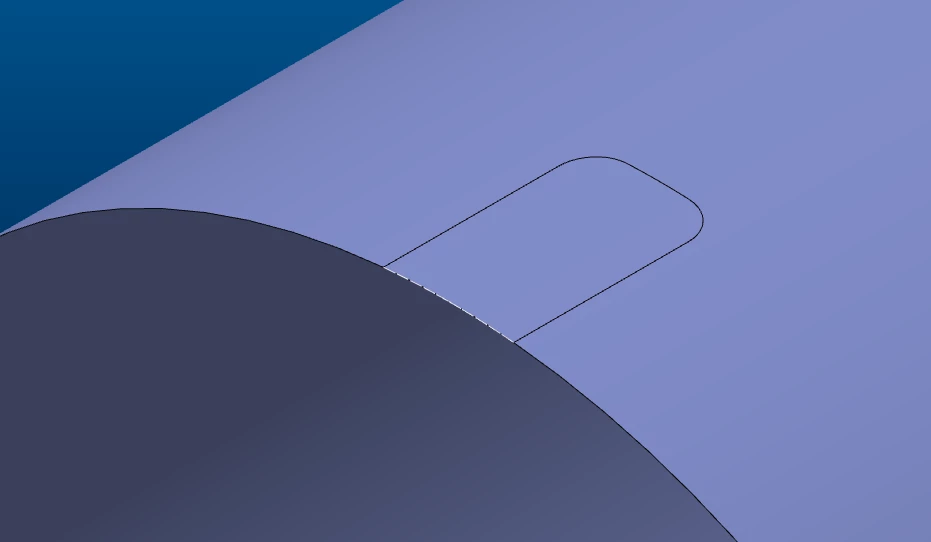
After filling a notch in a rounded surface I merged them but the edges (facet) remains. Is there anyway to "repair" the the two surfaces so there are no edges. (See below)
2Capture.PNG

InoramAnswer
Oct 26, 2017 8:26 PM UTC

Are you going to make it solid? Then try Flexible > Remove. If you have Flexible.

5 replies

Oct 26, 2017 4:45 PM UTC

Just a few cursory observations:

(1) If the notch is a feature, why not just delete or suppress the feature?

(2) Why use surfaces? That is the most complicated way to do this. I would probably just use a protrusion from the flat face adjacent to the notch. Have it extrude up to the flat wall with the two fillets and it should be okay.

(3) Whatever method you use, you should probably check the accuracy (File->Prepare->Model Properties->Accuracy). Set it to absolute, usually the default number is okay. This can make troubles with edges matching go away.


Of course, we don't know where the model is coming from. It could be a downloaded model. These often have odd surfaces.

Oct 26, 2017 5:18 PM UTC

The surface did come from a downloaded model.

InoramAnswer
Oct 26, 2017 8:26 PM UTC

Are you going to make it solid? Then try Flexible > Remove. If you have Flexible.

Oct 27, 2017 2:26 AM UTC

This can be done using surface offset command:

1. copy the surrounding surface.

2. offset and replace the surface patch using the surface copied in step (1)Capture.PNG


Oct 27, 2017 7:06 PM UTC

Assuming this is a cylinder, use the convert in the import data doctor.  Pick both sides of the cylinder then convert to cylinder.


You do not even need to create the fill surface.