Nov 29, 2018 1:52 PM UTC
Solved

Subtracting one body part from another body part

Hi,

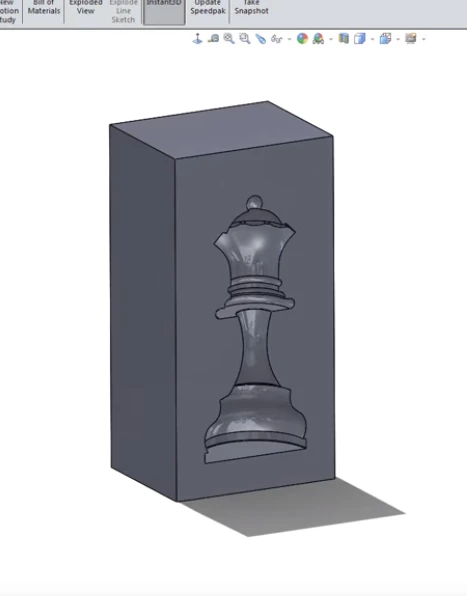
I am looking for help how to subtract a body part from another body part.

In SW it is called  Cavity.

Can anyone explain to me how to do it?

Thanks

Arek
susbtract - cavity.png

StephenWAnswer
Nov 29, 2018 2:38 PM UTC

Neither. The procedure I described above is in the part mode. Creo doesn't have multibody parts.


You can "merge/inherit" a part into another part, during that process you can specify if the merge part adds material or removes material.


There is a similar feature in assembly mode where you can "cut out" one part from another.

3 replies

Nov 29, 2018 2:20 PM UTC

For solid bodies, you can use Merge/Inheritance. In the part, go to the model tab, then the Get Data drop down arrow, Merge/Inheritance.

Just like an extrude, toggle to remove material, then you push the Open folder icon, select the body you will use for the remove, and "assemble" the body in as you do in assembly mode.

ArekTRIAuthor
Nov 29, 2018 2:28 PM UTC

Hi @StephenW

For clarification,

Should it be an Assembly or Multibody Part?


Thanks,

Arek


StephenWAnswer
Nov 29, 2018 2:38 PM UTC

Neither. The procedure I described above is in the part mode. Creo doesn't have multibody parts.


You can "merge/inherit" a part into another part, during that process you can specify if the merge part adds material or removes material.


There is a similar feature in assembly mode where you can "cut out" one part from another.
