Jan 21, 2020 9:32 AM UTC
Solved

Solid to Sheet metal - distinc elements

Hi,

I have created a solid part and converted it to sheet metal part. It consists of 4 distinct pieces. I can unbend all of them but how to create the drawings of each flat piece? 
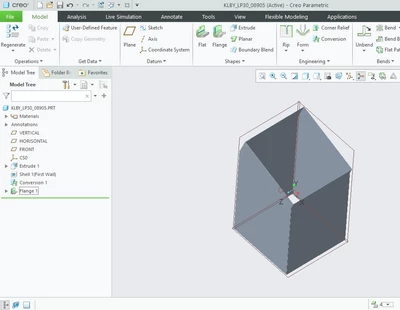
 

plos_0-1579598709503.png


best regards

Piotr

Jan 21, 2020 12:53 PM UTC

@plos 

As I mentioned previously, you cannot create drawing for each distinct piece.. 

Still if you need that, one of the alternate option can be material removal feature to have each side individually and control by family table. 

As, create extrude features for solid material removal in such a way that it will leave only one side for each extrude. later use family table and control extrude features.. 

8 replies

Jan 21, 2020 12:19 PM UTC

Drawing for each distinct piece cannot create.. commonly all the walls should be merged and and a single flat state defines the part for drawing. 

Can you share the file for review? 

plosAuthor
Jan 21, 2020 12:33 PM UTC

Thanks for the answer!
Here's the file. I wanted to have each wall as a separate part. I thought there should be an easier way than create 4 different .prt

Jan 21, 2020 12:53 PM UTC

@plos 

As I mentioned previously, you cannot create drawing for each distinct piece.. 

Still if you need that, one of the alternate option can be material removal feature to have each side individually and control by family table. 

As, create extrude features for solid material removal in such a way that it will leave only one side for each extrude. later use family table and control extrude features..
