
Mar 21, 2018 9:38 AM UTC
Solved

Save stand alone assy from Simplified Rep?

Hello,

I need to send an assembly to a supplier. But I don't want to send the complete assembly (both for security and convenience reasons). Is it possible to save a stand alone assembly from a Simplified Representation? I only find Copy As External, but that seems to include the complete assy.
TreblaAnswer
Mar 22, 2018 8:28 AM UTC

Hello Qmatic,


I assume you work also with Windchill..

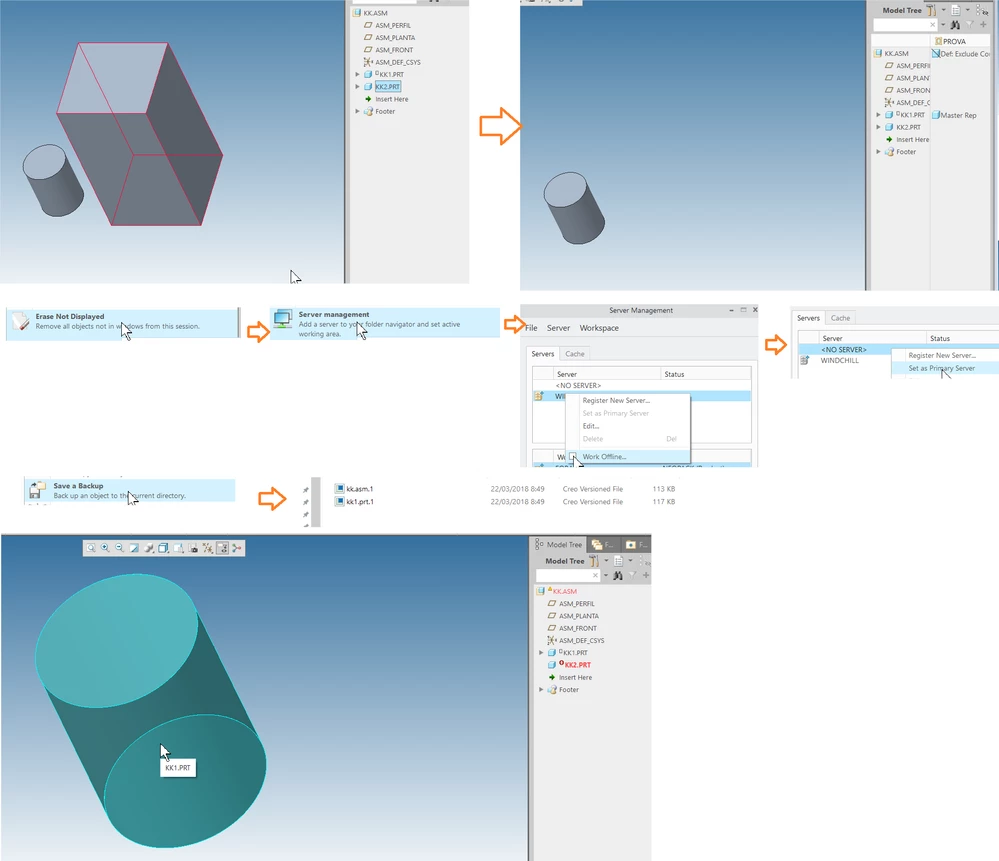
This is our way to do it: make a backup offline the server

Simp Rep.png


I am working always with the Windchill Server connected.

But as example, I have an assembly of 2 parts, I do a Simp Rep that only show one part. Save the assembly > Erase not displayed > Server Manager> WorkOffline and set No Server as a Primary Server>Save a BackUp

This backUp only have the assembly and the only part of my Simp Rep.

When you open this local copy, Creo can not find the second part... it's not perfect, but it is fine for us. I hope it helps you.


2 replies

TreblaAnswer
Mar 22, 2018 8:28 AM UTC

Hello Qmatic,


I assume you work also with Windchill..

This is our way to do it: make a backup offline the server

Simp Rep.png


I am working always with the Windchill Server connected.

But as example, I have an assembly of 2 parts, I do a Simp Rep that only show one part. Save the assembly > Erase not displayed > Server Manager> WorkOffline and set No Server as a Primary Server>Save a BackUp

This backUp only have the assembly and the only part of my Simp Rep.

When you open this local copy, Creo can not find the second part... it's not perfect, but it is fine for us. I hope it helps you.


QmaticAuthor
Mar 22, 2018 9:01 AM UTC

Thank you albert_t!! Yes, I work with windchill as you say. This was a very clever solution, indeed! I would never have worked that out.