
Feb 7, 2017 8:46 AM UTC
Solved

Save a display of displayed parts and assemblies on Direct Modeling 17.0?

Hello,


Is there any way to in a big assembly retaining visualization of parts and subassemblies (hide and unhide).


I mean, I have a lot of parts hide and unhide in my structure browser, Is it possible to save this?


I want to change the display of displayed parts (hide and unhide) and quickly return to the previous visualization in a simple way.


Is it possible?


Thanks in advance.


Regards.
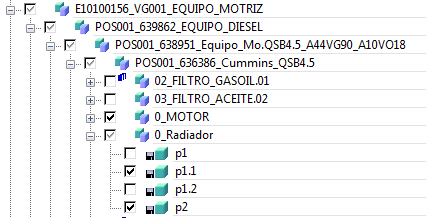
 

Captura.PNG


Feb 7, 2017 1:46 PM UTC

If you have Model Manager, you can save a snapshot.  First all components must be saved and then you can save a snapshot which will save what is displayed in the current session.

If you do not have model manager, you can save a session. Which saves the current state.

Regards

Tom

5 replies

Feb 7, 2017 1:46 PM UTC

If you have Model Manager, you can save a snapshot.  First all components must be saved and then you can save a snapshot which will save what is displayed in the current session.

If you do not have model manager, you can save a session. Which saves the current state.

Regards

Tom

Ed13Author
Feb 7, 2017 2:36 PM UTC

Thank you!!!

Best regards.

Feb 7, 2017 11:29 PM UTC

Another option to Snapshots in Model Manager is to create one or more Configurations under the assembly.  Each one can have its own hide/unhide set.  With a right-click on the configuration, you can capture the camera angle, the drawlist (hide/unhide), or both.  After it is created, with a right-click on the configuration under the assembly, you can apply the camera, the drawlist, or both.

configurations.jpg

Ed13Author
Feb 8, 2017 10:06 AM UTC

Hello ,

All of ways are right.

Depends on your needs one way is it better than the other one.

Thank you everyone for your support..