
May 17, 2018 9:42 AM UTC
Solved

Rotate assembly/view view with respect to current view.

How can i rotate model with respect to the current viewing position.

lets say i am looking at the Front view, is there a way to rotate the view 90 deg to get the top view without having to select the Top view the view orientations.


Note : I am used to this kind of thing in SW and it was very helpful in viewing all possible angles using just arrow keys and Shift+arrow keys. i just want to know is it possible to do in Creo.


Thanks in advance for your answers.
StephenWAnswer
May 19, 2018 12:18 PM UTC

Great.

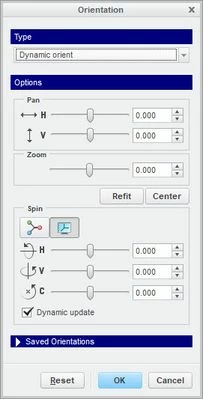
For the 90° orientation, make a mapkey using dynamic orient. Go to the view tab, saved orientations, reorient, then you'll get a pop up orientation box, change the "type" to dynamic orient. Then you and key in orientation angles based on the axis you want to spin around. 


orient.jpg

10 replies

May 17, 2018 10:43 AM UTC

You can dynamically orient a view and chose horizontal with a value of 90 degrees.


If this happens often you can capture a mapkey to make this move. Or create a mapkey that selects Top.

vdevanAuthor
May 17, 2018 12:27 PM UTC

i am not an expert in creo, and I find it hard to understand ..

can you share any tutorial relating to this .. 

May 17, 2018 12:57 PM UTC

You can't use the arrow keys like that in Creo.

You can create mapkeys to do what you want.


The link is a youtube video on how to create mapkeys.

There are also a lot of posts on creating mapkeys in the forum, many of which deal with view orientation.


https://www.youtube.com/watch?v=FWp_ASys8ZE

vdevanAuthor
May 19, 2018 12:00 PM UTC

hey Stephen, 

Thank you so much for the response.

I tried doing map keys, and could successfully create map keys.

i faced 2 problems,

1. It do not accept combination with Shift / Ctrl 

2. I still cannot figure out a way to rotate my current view,  90 deg Right or 90 deg left.


am not worried about the first one , i need answer for second.

Thanks in advance.


StephenWAnswer
May 19, 2018 12:18 PM UTC

Great.

For the 90° orientation, make a mapkey using dynamic orient. Go to the view tab, saved orientations, reorient, then you'll get a pop up orientation box, change the "type" to dynamic orient. Then you and key in orientation angles based on the axis you want to spin around. 


orient.jpg