Oct 10, 2020 7:05 AM UTC
Solved

Repeat Region issue !

Hi,

I have an problem about the table.

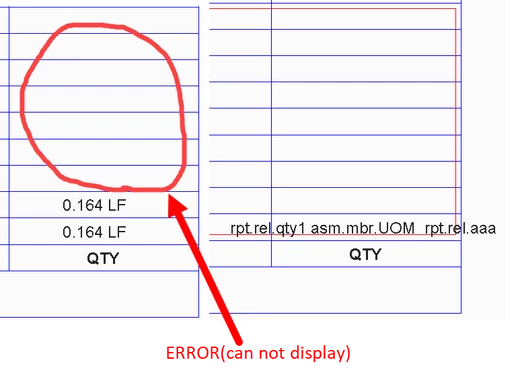
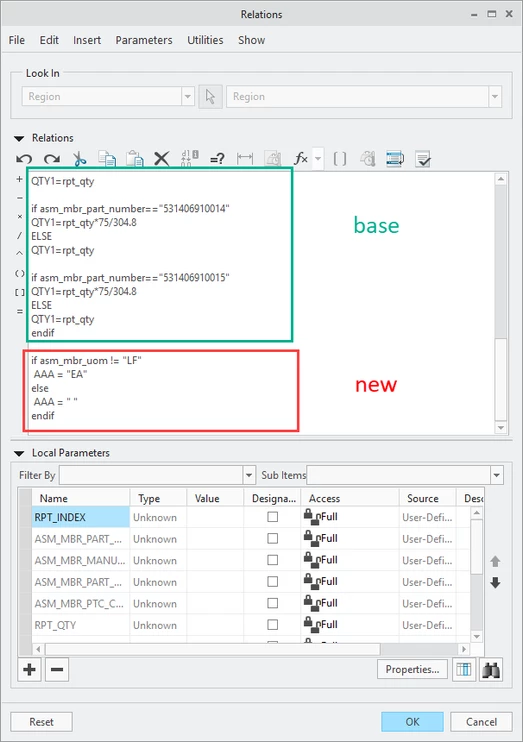
The user defined parameter can not displayed after i add some new code.
1111.png

                                        PIC 1 


222.png

                                               PIC 2

333.png

                                                         PIC 3


When i add the new code in PIC 3. The parameter (QTY1) can't correctly display after update table (see PIC 2)

I don't know what went wrong. There is no problem with the new code.


Oct 15, 2020 1:03 AM UTC

i use an other code instead of the NEW CODE in PIC3 which solved the problem of user defined parameter (QTY1 ) display. 


1.png

11 replies

Oct 10, 2020 8:28 PM UTC

Can you upload a sample file and state what version of Creo it was created in?

Oct 15, 2020 12:48 AM UTC

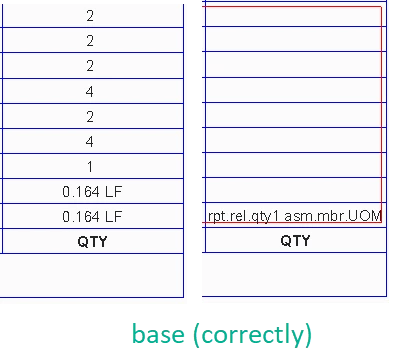
Please see attached for base code. I used another form of code to solve the problem. 

Oct 15, 2020 12:49 AM UTC

CREO 4.0

Oct 11, 2020 11:49 AM UTC

@ZC_8293506 wrote:

Hi,

I have an problem about the table.

The user defined parameter can not displayed after i add some new code.

1111.png

                                        PIC 1 


222.png

                                               PIC 2

333.png

                                                         PIC 3


When i add the new code in PIC 3. The parameter (QTY1) can't correctly display after update table (see PIC 2)

I don't know what went wrong. There is no problem with the new code.


Hi,

look at base code ... endif command is missing at the end of first if command.

Oct 15, 2020 12:55 AM UTC

Sorry,  i deleted the ENDIF in PIC 3 by accident  which made the code looks have some bug. But the lack of ENDIF does not exist in the base code. 

Please see attached for base code. I used another form of code to solve the problem. 

Oct 12, 2020 12:36 PM UTC

Looks like you're missing an 'ENDIF'.

Oct 15, 2020 12:57 AM UTC

Sorry,  i deleted the ENDIF in PIC 3 by accident which made the code looks have some bugs. But the lack of ENDIF does not exist in the base code. 

Oct 12, 2020 12:45 PM UTC

@ZC_8293506


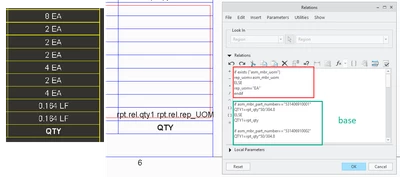
Relation as in image may help.... 


MaheshSh_0-1602506754515.png


EDIT: If this doesn't work, share a sample file and replace the report parameter asm_mbr_name with asm_mbr_part_number or as per your use case with appropriate values. 


Oct 15, 2020 1:30 AM UTC

Thank you for your new idea !

But it look like another user defined parameter "AAA" can't display correctly. Creo4.0 is strange😂

6666.png 

The error also exist in your screenshot

9999.png

ZC_8293506AuthorAnswer
Oct 15, 2020 1:03 AM UTC

i use an other code instead of the NEW CODE in PIC3 which solved the problem of user defined parameter (QTY1 ) display. 


1.png

Oct 15, 2020 1:06 AM UTC

Of course . I don't know what's wrong with the code (in PIC3) I added before. But they do cause the display error. 😰