
Mar 17, 2025 11:23 AM UTC
Solved

Quickly measure distances on the fly

I am using Creo 10.0.7.0 and I was used to taking my measurements without the measure tool on the fly for simple things to enhance productivity and speed. Is there someway I can make this happen in CREO?

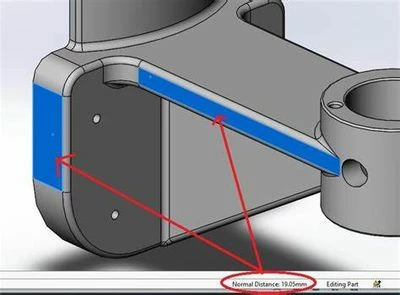
An example
Shumayal_2-1742210416752.jpeg


I already have a shortcut on the pop up menu but it's easier if I just click an edge or two faces and get an output immediately on the information on the message log.

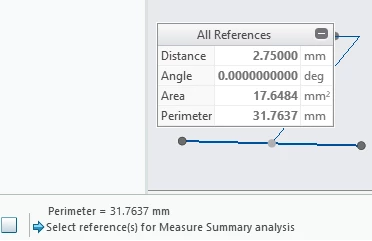
It already gives me outputs from the measure tool to the message log as shown below.
Shumayal_1-1742210159321.png

I want it to

  1. Give priority to 'distance' and show distance in the message log, not perimeter or just show both.
  2. Output length every time I have selected an edge,
  3. Output radius each time I have selected a circle/arc,
  4. Output distance each I have selected two planes that are parallel to each other.

Is it possible to have this in message log or someplace else?

kdirthAnswer
Mar 17, 2025 12:00 PM UTC

There is an Idea posted that covers what I believe you are asking.  Vote for it to let PTC engineers that you want it.


Measurement in status bar - PTC Community

4 replies

Mar 17, 2025 11:56 AM UTC

It shows all the outputs in the message log, you either need to show more lines in the message log or you need to scroll in the message log.

To show more or less lines in the message log by default, there is an option in the config.pro 

Visible_message_lines 4

where the number represents how many lines you want to see.

StephenW_0-1742212438063.png


kdirthAnswer
Mar 17, 2025 12:00 PM UTC

There is an Idea posted that covers what I believe you are asking.  Vote for it to let PTC engineers that you want it.


Measurement in status bar - PTC Community

ShumayalAuthor
Mar 19, 2025 5:23 PM UTC

That's correct. It is exactly what I wish I had. 

I also miss the way solidworks shows the distances projected in all planes and the shortest path between to points. Saves a lot of time from 'projecting'.

Mar 19, 2025 5:32 PM UTC

Here is the measure tool implemented with the projection as a nested mapkey. You can copy the mapkey definitions from here.

Incremental measure (delta x,y,z) function in Creo... - PTC Community


You can also of course put this mapkey in the GUI if you desire to.


Caveat: I have only used this up to Creo 9 in part and assembly mode. Make sure to read the thread in the link about the projection reference that must exist in the model for the mapkey to work properly.


tbraxton_0-1742405405603.png