
Oct 22, 2018 1:39 PM UTC
Solved

Pattern of family-table parts

Is there a way to create an assembly of all (or certain) instances which are in a family table of a part?

For example:

1. I do have a part with a family table of all different bolts in (M8x20, M8x25, M8x30,...)
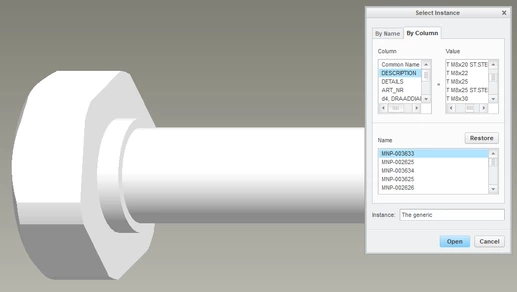
Bolt Family Table.png

2. I create an assembly with the generic of this "family tabe"-part in the default position

3. I will make a pattern of this generic part, but not only the position of this bolt will change but also the instance
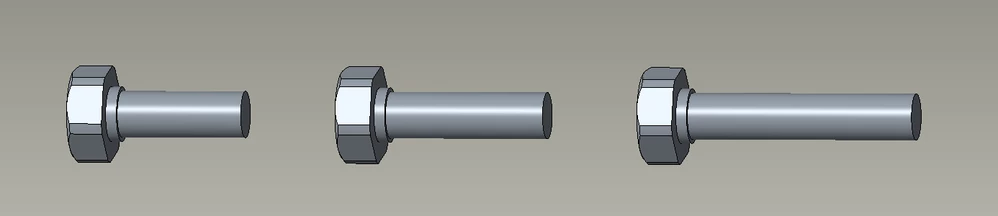
Bolt assembly.pngIs there maibe a way by doing this with a "table pattern" or in combination with a parameter which is in the part?

If this is possible, this will help us a lot!
Oct 29, 2018 9:01 AM UTC

Hi Guys,


this works perfect! 

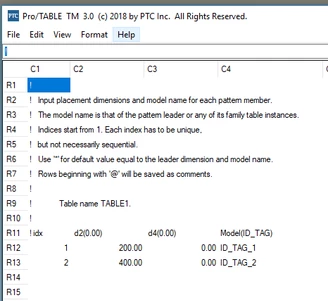
I've created the table-pattern like this:


2018-10-29 09_56_50-Window.png


And this is the result:

2018-10-29 09_59_51-Window.png

Exactly what I wanted!

Thanks a lot guys.

17 replies

Oct 22, 2018 1:50 PM UTC

Are you asking if there is a way to make a "catalog" of all the instances in the family?

Oct 22, 2018 2:03 PM UTC

Actually, we want to create "ID tags" in a family table and put them all in one assembly.

The bolts are just an example to explain it.

Oct 25, 2018 10:49 AM UTC

What are "ID tags"?


Can you show a picture of what you are trying to accomplish?

Oct 23, 2018 2:50 PM UTC

Hi,

I guess you have to generate trail file and run it to assemble family table instances.

See my attached data created in CR2 M070.

1.] I prepared bolt.prt containing 3 family table instances

2.] I prepared bolt.txt trail file containing 3 blocks for assembling 3 family table instances

3.] TEST: Launch Creo 2.0, create new empty assembly, play trail file - you will get result shown on bolt.png picture


Note: To prepare trail file for big family tables, user can create some script which gets a list of instances and generates trail file for assembling all of them.


Oct 25, 2018 6:18 AM UTC

Hi Martin,


I've tried to run the trail file.

Bolt_1 opens, but won't be placed... and there it stops.

Is there something I have to do in another way?


Thanks for your help!

Oct 25, 2018 8:13 AM UTC

Hi,

what Creo version do you use ?
