May 6, 2021 11:38 AM UTC
Question

Orientation of chamfer dimension in drawing

Hi,

Is there a way to switch orientation of chamfer dimension in drawing?

I mean the chamfer dimensions showed from model, not created in drawing.

(Creo 7)
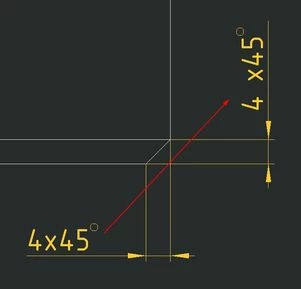
a.jpg


Michal.


14 replies

May 6, 2021 12:30 PM UTC

Hi,

You can change the shape of the chamfer by drawing options.


Mathpp_0-1620304072652.png


When you have the drawing open, go to File -> prepare -> drawing properties

Click on "change" in the detail option.

Click on "FIND" and look for the command in the image above.


The commands shown above are from CREO 4, but I believe it should be the same for 7.


In addition, the dimensions taken from the Chamfer must come from the "Show models annotations"

May 6, 2021 2:49 PM UTC

The orientation of the shown dimension is based on the orientation of the feature.  In the model, edit the definition of the chamfer and flip its orientation.

kdirth_0-1620312548543.png


May 6, 2021 4:44 PM UTC

But I have't this option ...... (Creo 7)


MichalLukac_0-1620319328069.png


May 6, 2021 4:51 PM UTC

I am on 4.0.  However there should be a way to determine what surface to measure the angle from.  The RMB menu or one of the tabs should have something.

Dec 25, 2025 9:36 AM UTC

When I look up this topic, I can hardly imagine this is still a problem in Creo for so many years....

I do think the length D should always be an axial dimension since it is a chamfer.

So it should be an easy one for PTC to fix, or at least give us an option to flip. 

Dec 31, 2025 5:38 AM UTC

Have a look at the following settings in your .dtl files (both in Model and in Drawing) and set them as desired. Reload the config files for the drawing and same them for any new drawing.

---------

default_chamf_dim_configuration
default_chamf_text_orientation
default_diam_dim_arrow_state
default_chamfer_text

--------------------
