
Apr 9, 2018 4:16 PM UTC
Solved

OpeningText Symbol Pallet while inserting a text note in Creo 3.0

Sometimes I want a diameter symbol or a plus/minus symbol when I am creating a note but I can only edit the note afterwards to add the special characters.  Is there a way (ie: ctrl S) to call up the text symbol pallet while inserting a note in Creo 3.0?
StephenWAnswer
Apr 9, 2018 5:21 PM UTC

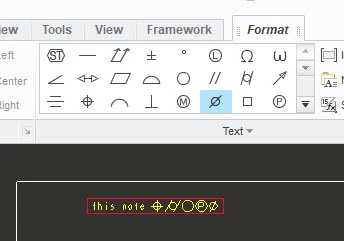
When creating a note, they have the special characters palette in the ribbon when you are first creating a note.

palette.jpg

3 replies

StephenWAnswer
Apr 9, 2018 5:21 PM UTC

When creating a note, they have the special characters palette in the ribbon when you are first creating a note.

palette.jpg

Apr 9, 2018 7:24 PM UTC

StephenWilliams is exactly right, and normally I will click from that menu. But when I don't feel like taking my hands away from the keyboard for a mouse-click, I also use alt-codes for the character I want, most often "±". To use these codes, hold down the alt key while typing the number on the keypad for the symbol you want, then release the alt key. ± is "alt 241", while ø is "alt 0248". Putting "alt symbols windows" into a search engine will offer several pages with relevant lists.