Dec 1, 2021 3:42 PM UTC
Solved

One-sided diameter dimension

Hello.


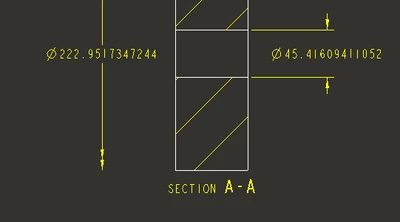
How do I show one -sided diametral dimension in Creo drawing application as shown below?
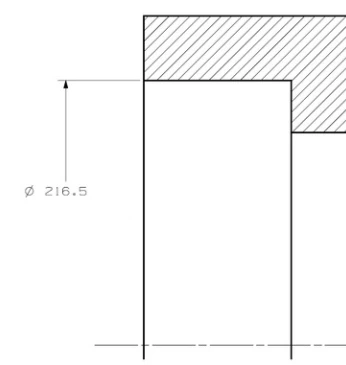
Sergey_0-1638373297327.png

Best regards,

Sergey


StephenWAnswer
Dec 1, 2021 4:04 PM UTC

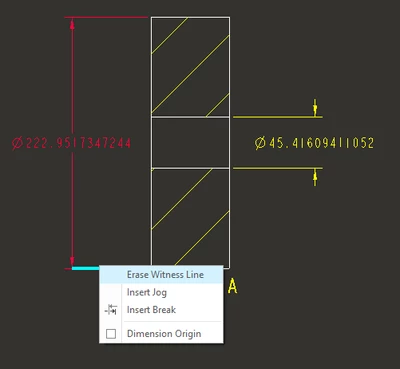
Select the witness line you want to remove then RMB erase witness line.

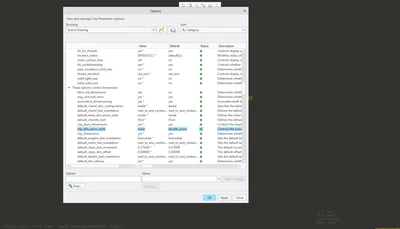
Depending on your drawing settings, you will get different results. If you need to, go to file - prepare - drawing properties - detail options change

and set the option clip_dim_arrow_style NONE

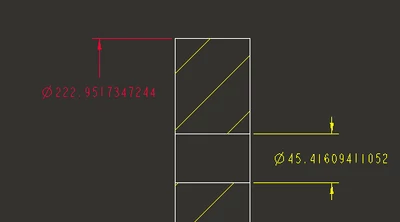
then you can "drag" the "none" arrow side to however you want it.


StephenWilliams_0-1638374576484.png


StephenWilliams_1-1638374599098.png


StephenWilliams_2-1638374607781.png

StephenWilliams_3-1638374619627.png


8 replies

Dec 1, 2021 3:56 PM UTC

If you use a shown dimension in a drawing view it will appear with arrows across the diameter. After showing the dia dimension use the flip arrows options and it should create what you want.

SergeyAuthor
Dec 1, 2021 4:00 PM UTC

It is not so simple.

I have made a Detailed view of a cross-section. Center line isn't there to create a diametral dimension. Any thoughts? 


Sergey_0-1638374431138.png


Dec 1, 2021 4:06 PM UTC

Show your dimension from the model OR create your dimension in the main view and move it to the detail view OR temporarily change your detail view boundary to include the centerline, create the dimension, then re-sketch the boundary as desired.

StephenWAnswer
Dec 1, 2021 4:04 PM UTC

Select the witness line you want to remove then RMB erase witness line.

Depending on your drawing settings, you will get different results. If you need to, go to file - prepare - drawing properties - detail options change

and set the option clip_dim_arrow_style NONE

then you can "drag" the "none" arrow side to however you want it.


StephenWilliams_0-1638374576484.png


StephenWilliams_1-1638374599098.png


StephenWilliams_2-1638374607781.png

StephenWilliams_3-1638374619627.png


SergeyAuthor
Dec 1, 2021 4:14 PM UTC

Hello again.


Thanks for help. It worked. 
Please, combine both your posts into one so that I will be able to accept it as the complete solution.


Sergey