
Jan 11, 2017 4:17 PM UTC
Solved

New drawing format and template

I have renamed our existing part drawing template and format and have added a BOM table, so I am using a single template for parts and assemblies. The engineer only needs to delete the BOM if it is a part file and a material table if it is an assembly.

However, when I create a new drawing and use the new template, the BOM does not populate automatically. If I add the BOM table to the drawing, it will populate 'manually'. What could be causing this to function to not work automatically from the drawing template?

Creo 2 m220

Windchill 10.0 m040
TomUAnswer
Jan 11, 2017 4:41 PM UTC

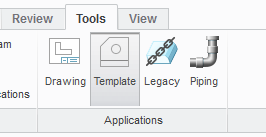
Was the template in "template mode" when the repeat region was added to it?

(Might be located somewhere else in Creo 2.)

3 replies

TomUAnswer
Jan 11, 2017 4:41 PM UTC

Was the template in "template mode" when the repeat region was added to it?

(Might be located somewhere else in Creo 2.)

BenLoosliAuthor
Jan 11, 2017 4:51 PM UTC

The repeat region BOM table and other tables are added at the format level then the format is added to the drawing template.

I will try to replace the format with the drawing set to template mode and see what happens.

BenLoosliAuthor
Jan 11, 2017 4:59 PM UTC

Adding the format to the drawing while in template mode did the trick.

Thanks, Tom.