
Jan 21, 2020 7:20 PM UTC
Solved

Need to know how to get text height correct coming from Drawing Format

I don't do to many drawings, when I do it's painful.


In this case another user built a drawing format that is unusable due to text sizes coming across incorrectly.
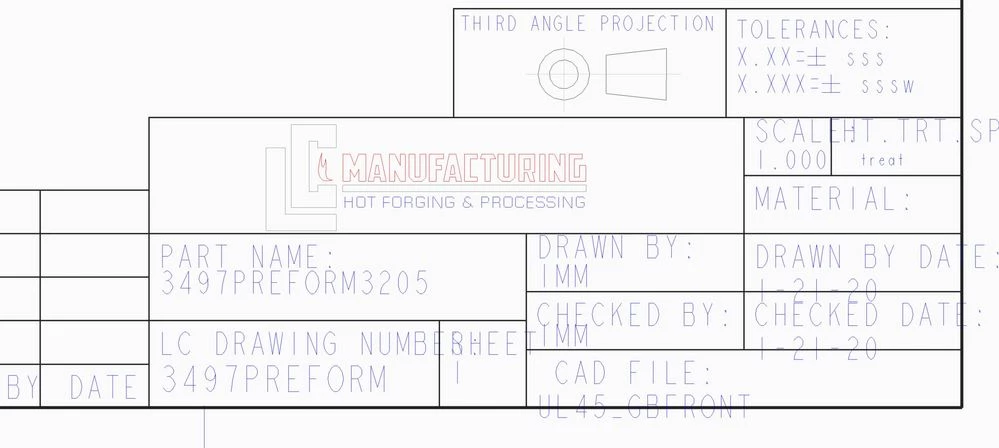
a format start.JPG

As you can see when I start a new drawing most of the text comes across at the same size but not exclusively so.  The format for this title block looks fine.  I know for a fact that the text height changes when you begin a drawing based off the drawing format.  What would I need to do to get this under control? 

TomUAnswer
Jan 21, 2020 7:57 PM UTC

Switch to 'Table' tab, pick a table cell, right click, 'Properties'.

6 replies

Jan 21, 2020 7:32 PM UTC

@pimm wrote:

I know for a fact that the text height changes when you begin a drawing based off the drawing format? 


This is probably due to some of the text heights in the format being set to 'Default', meaning they will automatically track the default text height for that drawing instead of using a fixed value.


TomU_0-1579635117993.png


pimmAuthor
Jan 21, 2020 7:49 PM UTC

Hi Tom,


This is very strange.  I can't even find the heading of Note Properties so I can verify this.

TomUAnswer
Jan 21, 2020 7:57 PM UTC

Switch to 'Table' tab, pick a table cell, right click, 'Properties'.

Jan 22, 2020 6:37 AM UTC

Hi,

your problem may also be because your Creo installation does not contain the font used by the author of the drawing format.