
May 30, 2018 4:54 PM UTC
Solved

Mini Toolbar icons; Creo 4 upgrade

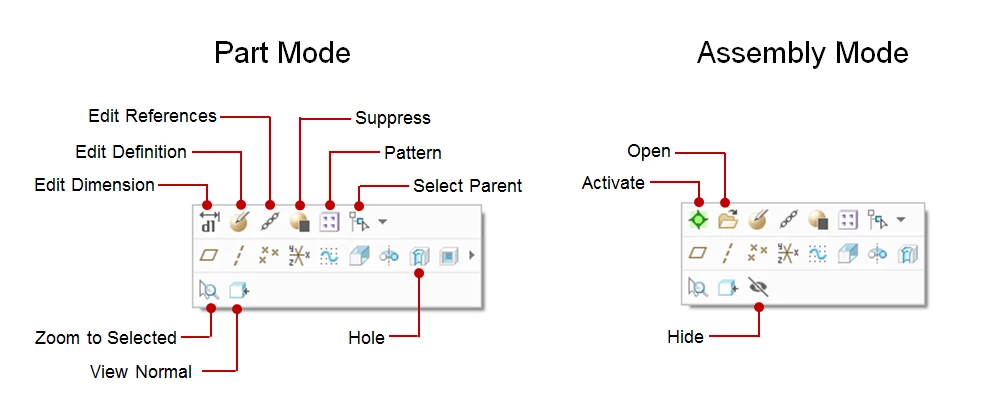
I am working on training for our users when we move to Creo 4. The Creo 4 quick reference card does not have a breakout for the mini toolbar with arrows and words explaining what each icon means. This is probably because the mini toolbar changes with context and user preference.


That being said has anyone else generated a graphic showing the default buttons?
Chris3Answer
Jun 27, 2018 1:32 PM UTC

For anyone that comes across this in the future - PTC has icon definitions for Simulate (link below) but nothing for core modeling (go figure).

http://support.ptc.com/help/creo/creo_pma/usascii/index.html#page/simulate/simulate/getstart/getstart/reference/3d_mini_toolbar_commands.html


I made my own for training purposes:

Capture.PNG

1 reply

Chris3AuthorAnswer
Jun 27, 2018 1:32 PM UTC

For anyone that comes across this in the future - PTC has icon definitions for Simulate (link below) but nothing for core modeling (go figure).

http://support.ptc.com/help/creo/creo_pma/usascii/index.html#page/simulate/simulate/getstart/getstart/reference/3d_mini_toolbar_commands.html


I made my own for training purposes:

Capture.PNG