Sep 12, 2019 5:03 PM UTC
Question

Metal Grating

Hi Creo Community,


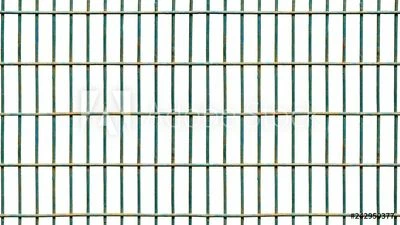
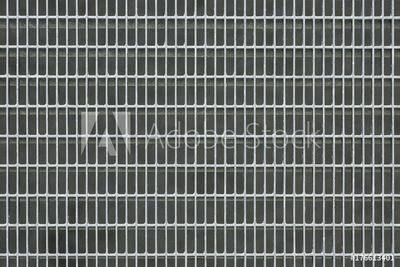
I'm running creo 5.0.4. I'm trying to make some metal grating like the pictures below. To give you an idea of scale, a single hole is about 1" wide and about 3" long. I need to create a sheet of this about 40ft long and about 10ft wide. How would you recommend doing this? is there a way to use a cosmetic feature or perhaps get creo to treat it as a single feature not 20,000 features such as in a fill pattern? Or perhaps as a material/texture?


Thanks!
AdobeStock_176613401_Preview.jpegAdobeStock_242950377_Preview.jpeg

11 replies

Sep 12, 2019 5:06 PM UTC

What do you intend to do with the file? Just a pretty picture or something that will be cut and mated to a structure?

Sep 12, 2019 5:14 PM UTC

Hi BenLoosli,


I have a big part part (see below) that needs to have this grating across the entire top where the yellow solid plate is shown. I can add it to this part or can create a new part and add it into an assembly. Image 1.jpg

Sep 12, 2019 5:21 PM UTC

One way to actually model this would be to use geometry pattern and even a pattern of a pattern. I'm attaching a brief presentation I did on this. It's from an old version of Pro/E so you'll have to forgive the actual GUI selections.

Sep 12, 2019 5:23 PM UTC

WOW! Awesome, I will try this out. Thanks for the tip!

Sep 12, 2019 5:32 PM UTC

Another time saver in newer releases of Creo, (I'm using Creo 4.0 M140), is the "identical" option. This alone cut over 75% from regen time in large patterns. (See attachment)

Sep 13, 2019 7:15 PM UTC

I came across a method referred to as turbo pattern.  This helps a lot with regeneration of complicated feature patterns.  Should help with simple ones also.


TURBO PATTERN (Patterning complicated features without overly slowing regeneration)

  • Create single feature
  • Copy surfaces down to base of feature
    • Hint: Select single surface on feature, hold shift and select bounding surface(s) and release shift. This should select all of the surfaces of the feature.
  • Pattern surface copy
  • Solidify original surface copy
  • Pattern solidification
Sep 13, 2019 7:38 PM UTC

this is exactly what the Geometry pattern does except that it waits to do the solidification till the end because that is actually the slowest part of feature creation.