Apr 6, 2020 12:22 AM UTC
Solved

Merging Sketched Datum Curves

Community,


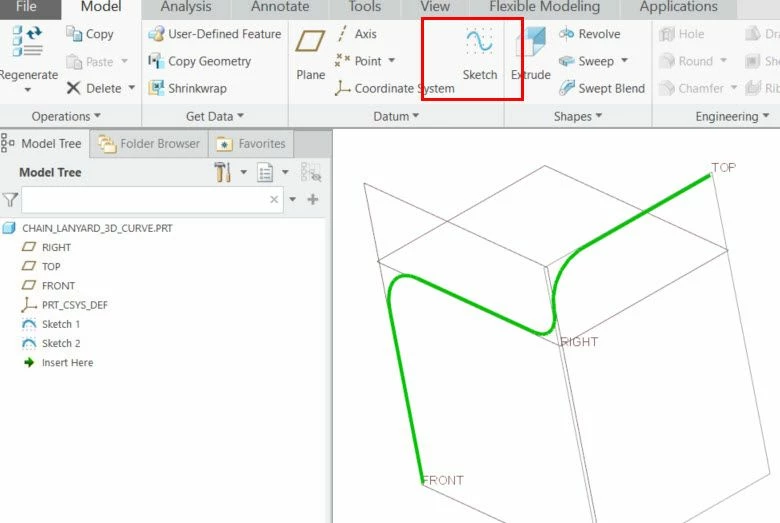
Consider the below image.  There are two curves created with the Sketch Tool (datum curve sketching).  Is there a way to merge these two curves to make them act as one curve?  Thank in advance.
 

sketc_3d_merge_curves.jpg

Apr 6, 2020 5:27 AM UTC

Hi,

see uploaded file created in Creo 6.0.4.0.

11 replies

Apr 6, 2020 1:32 AM UTC

You can create a composite curve of 2 or more curves that have G0 or higher continuity connection.


Select the first curve and use CTRL+C then CTRL+V

Hold down the shift key and select the connected curve(s) they should all be highlighted as selected

Select the exact or approximate option and complete the feature. Approximate option will create a curvature continuous curve if the references are less than G2 continuous

ThoRigAuthor
Apr 6, 2020 2:25 AM UTC

That will work to make a "copy" of one curve.  However, when I try to pattern a point on the copied curve (from the chain lanyard problem), I cannot make the point pattern.  It will not allow me to select the curve.  So...I was trying to figure a way to merge the curves instead of copying them.

Apr 6, 2020 5:27 AM UTC

Hi,

see uploaded file created in Creo 6.0.4.0.
