Apr 28, 2020 3:04 PM UTC
Solved

MBD red line at a geometric tolerance

Hello,


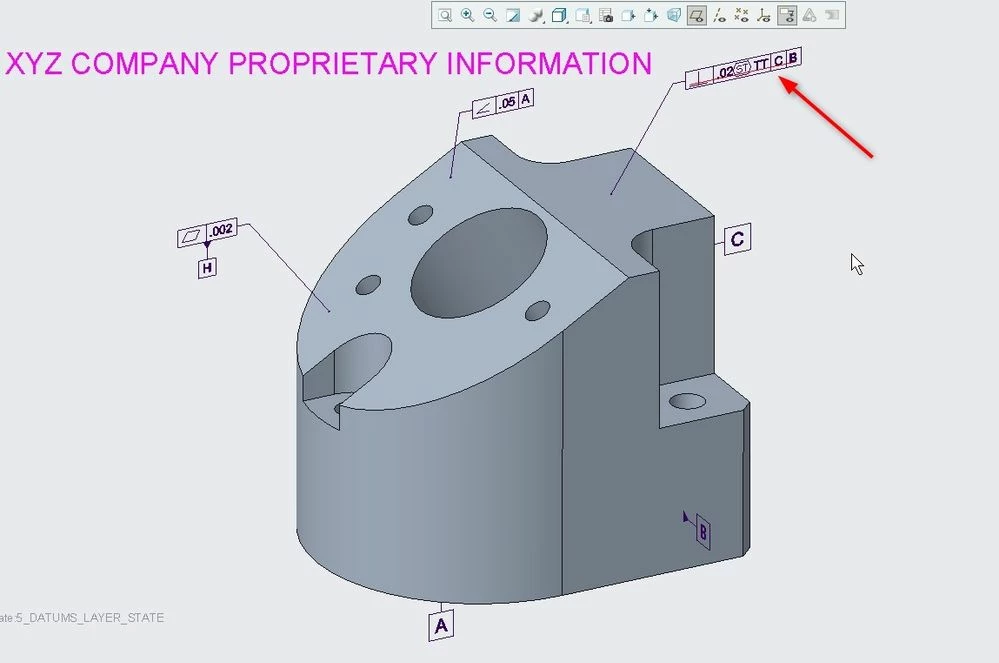
What does it mean the red line under the annotation geometric tolerance? 

Creo 6.0.4.0
2020-04-28_15h59_04.jpg

Thanks

🙂

RyanGAnswer
Apr 28, 2020 5:08 PM UTC

It's like spell checker for Office applications, only it is checking for proper GD&T definition.  It may not like the "TT" you have after the "Statistical" modifier symbol.


4 replies

Apr 28, 2020 4:57 PM UTC

I'm not using Creo 6, but in Creo 4, such a red line means that I'm missing something in my geometric tolerance definition. For example, if I have a parallelism tolerance but don't reference another datum, I get the red line.

Usually, for me, the reason for the red line is given in the message bar at the bottom of the main window. Something like "A datum reference is required".

Apr 29, 2020 8:57 AM UTC

I'm exploring the MBD now.

Thanks Ken. 

RyanGAnswer
Apr 28, 2020 5:08 PM UTC

It's like spell checker for Office applications, only it is checking for proper GD&T definition.  It may not like the "TT" you have after the "Statistical" modifier symbol.


Apr 29, 2020 9:01 AM UTC

There is logic in what you said 🙂

Thanks for your answer.
