
May 15, 2024 8:12 PM UTC
Solved

Looking for a specific type of Rotational Equation Curve

I have successfully used a specifically sized flat Equation curve in my die designs.  I have on a number of occasions however needed to use the same radius and spacing around a rotation which to this point have been very fudgy.

Below is the equation that I have been using.
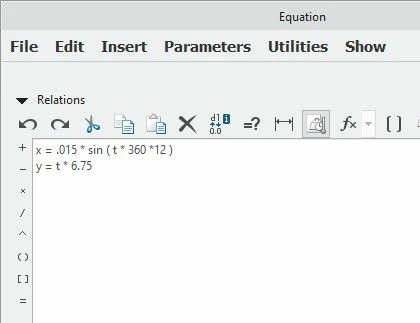
eq-curve-flat.jpg

This results in a curve like the following.
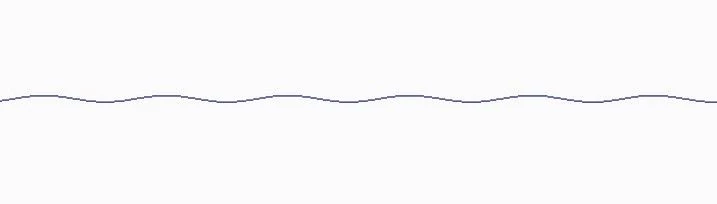
eqflat.jpg

Would it be possible to make an equation curve to the below shape?  
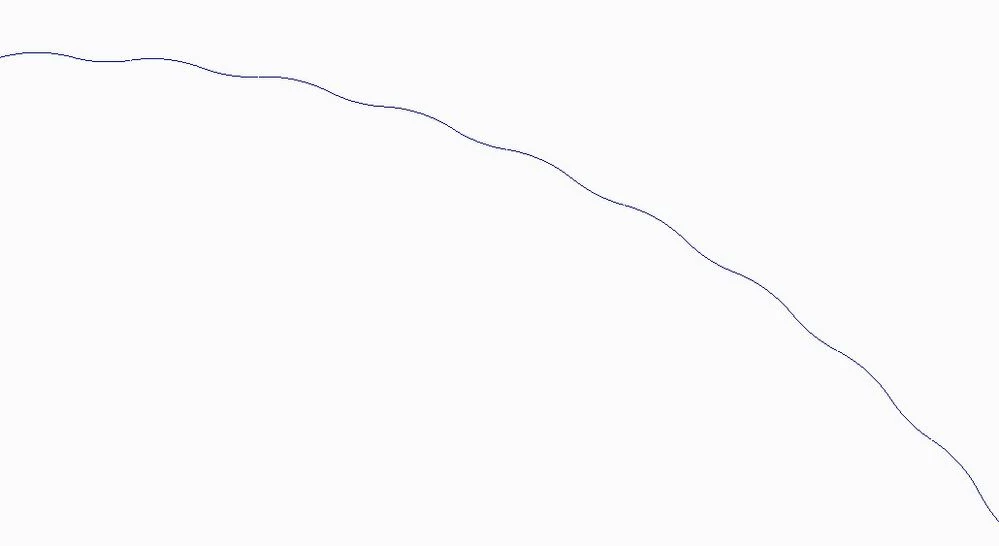
 

roundscallop.jpg

The spacing would be the same as with the top example but I would somehow need to be able to define a center or slope.  Can this be done?
kdirthAnswer
May 16, 2024 12:51 PM UTC

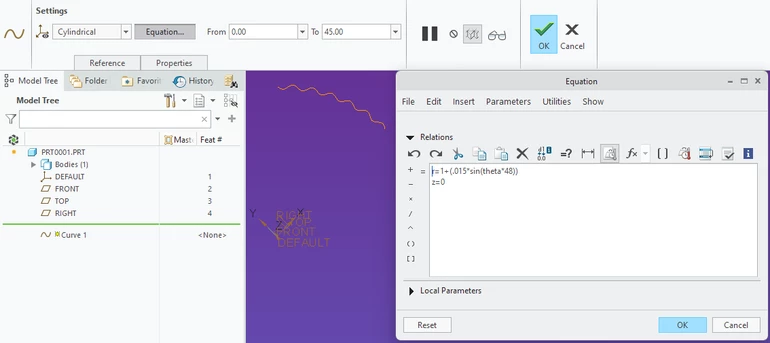
If you are looking to follow a true radius, I agree with @KenFarley  that a cylindrical equation may work well:

kdirth_0-1715863320251.png

You may also want to consider using construction geometry to get the desired path:  Create a curve for the sine wave to follow. Create a surface sweep using relations to create the sine wave around the curve.  Use/copy edge of surface.


20 replies

May 15, 2024 8:21 PM UTC

Are you looking for something like this:

kdirth_0-1715804461887.png


pimmAuthor
May 15, 2024 8:36 PM UTC

Kdirth:  This is a very nice arithmetic style curve but unfortunately not what I'm trying to achieve.   


What I am looking for is a curve that doesn't have any 3 dimensional depth.  The rotation that I am looking for above would be similar to taking a cross sectional slice of a Recess Peanut Butter Cup.  (The rotation I have been looking for would be on the same 2D axis.)

kdirthAnswer
May 16, 2024 12:51 PM UTC

If you are looking to follow a true radius, I agree with @KenFarley  that a cylindrical equation may work well:

kdirth_0-1715863320251.png

You may also want to consider using construction geometry to get the desired path:  Create a curve for the sine wave to follow. Create a surface sweep using relations to create the sine wave around the curve.  Use/copy edge of surface.


May 15, 2024 8:52 PM UTC

You are looking to superimpose a periodic function (sine/cosine) on a circle? Something that would look like this?


tbraxton_0-1715806138917.png


pimmAuthor
May 15, 2024 9:02 PM UTC

Tbraxton:

Yes; in the same orientation of what you show.  The challenge would be in keeping the inside radii the same as the outside radii and also maintaining a uniform spacing.

May 15, 2024 9:40 PM UTC

This is possible to do in Creo using curve from equation functionality. The parametric equation (cartesian coordinates) of the picture I posted above is:

tbraxton_0-1715809139311.png


May 16, 2024 10:38 AM UTC

Have you looked into using cylindrical equations (r, theta, z) instead of cartesian? It might make the mathematics more straightforward.

May 16, 2024 4:00 PM UTC

This gives you direct control of parameters in a single feature. Getting the syntax of the equations is the only tricky part to this. Amplitude, frequency and radial offset of the zero-amplitude circle are defined in the equations shown here in Creo syntax. You should be able to cut/paste this into your curve from equation feature definition. Make sure to set the domain of t from 0 to 360 (degrees) to cover a complete circle. 0-180 for half circle.


x=(1.5+0.5*sin(20*t))*cos(t)
y=(1.5+0.5*sin(20*t))*sin(t)
z=0


Curve from equation in cartesian system:

tbraxton_0-1715874918642.png


May 16, 2024 5:18 PM UTC

tbraxton_0-1715879860122.png


May 16, 2024 6:37 PM UTC

Y'all are rattling off formula's and all I can think about is how much I like reese's peanut butter cups! Nothing else matters!


pimmAuthor
May 16, 2024 7:04 PM UTC

Yes; that must explain why I just had some.  The power of suggestion.


I can't say it has made me understand this any better but at least I'm happy.